Free Google Ads Script
Multi-Account Budget Pacing Monitor
Track monthly budget pacing for up to 30 accounts in one daily run. Know which accounts are overpacing, underpacing, or exhausted — before your client notices.
This script tracks a monthly budget you define in CONFIG — it is not linked to Google Ads Budget Orders or billing limits.
What it monitors
- Monthly budget per account — you define each account's budget in CONFIG; the script does not read it from Google Ads
- Actual spend — real spend for the current calendar month in the account's time zone
- Linear plan — proportional monthly target for today's date: budget × (days elapsed / days in month)
- Deviation — how far actual spend is from the linear plan, expressed as a percentage
- End-of-month forecast — projected total if the current daily pace continues unchanged
- Remaining budget — how much of the monthly budget is left to spend
- Required daily spend — what average daily spend is needed to finish the month exactly on budget
Calculation
linear plan = monthlyBudget × (daysElapsed / daysInMonth)
deviation = ((actualSpend − linearPlan) / linearPlan) × 100
forecast = actualSpend / daysElapsed × daysInMonth
remaining = monthlyBudget − actualSpend
required daily spend = remaining / daysRemaining
Linear pacing is a reference benchmark. It does not account for seasonality, weekends, or campaign flight dates.
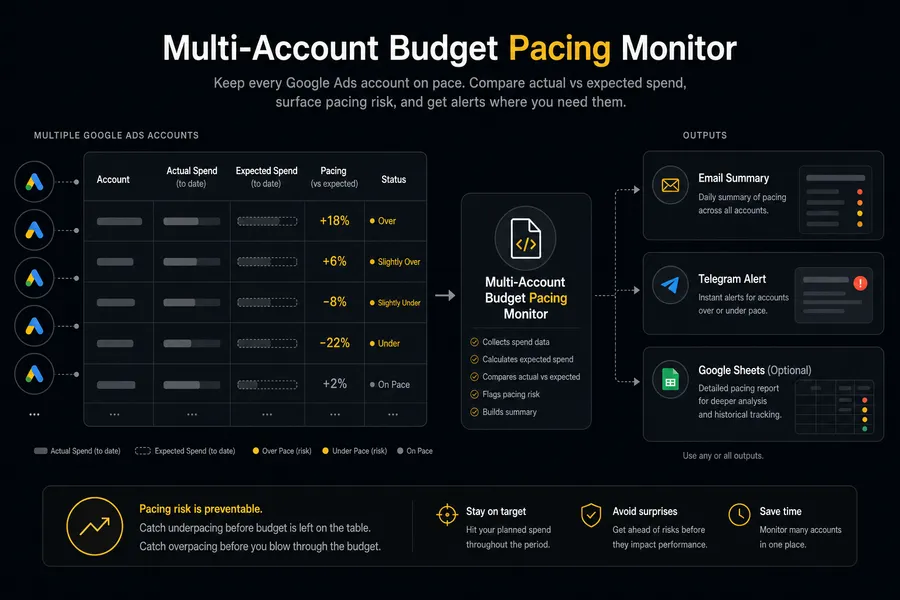
Pacing statuses
| Status | Meaning |
|---|---|
| BUDGET_EXHAUSTED | Actual spend has reached or exceeded the monthly budget. No more spend is expected this month under the current budget. |
| NO_SPEND | No spend recorded since the start of the month. The account may be paused, have no active campaigns, or be newly added. |
| OVERPACING | Spend is ahead of the linear plan by more than the configured tolerance. At this pace, the budget will be exhausted before month end. |
| UNDERPACING | Spend is behind the linear plan by more than the configured tolerance. At this pace, the budget will not be fully spent by month end. |
| ON_TRACK | Deviation is within the configured tolerance (±PACING_TOLERANCE_PERCENT). Accounts at exactly the tolerance boundary count as ON_TRACK. |
| ERROR | The account could not be accessed or its data could not be read. Does not block other accounts or notification delivery. |
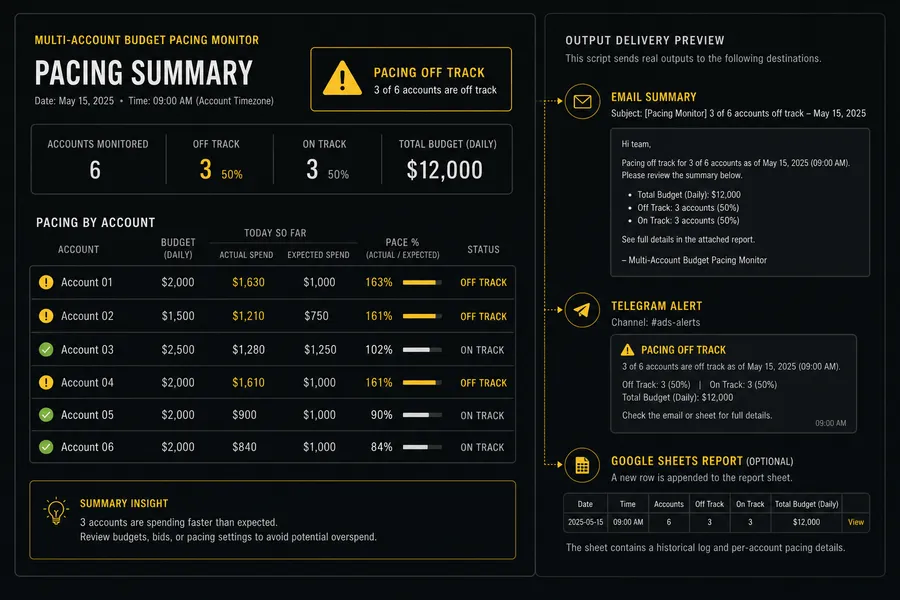
Notification examples
Sanitized demo data — no real account credentials or client information.
Email — one summary per run (accounts need attention)
Subject: Google Ads Alert - Multi-Account Budget Pacing Monitor - Check completed
Multi-Account Budget Pacing Monitor
Check completed
Environment: MCC
Accounts checked: 5
Overpacing: 1
Underpacing: 1
Budget exhausted: 0
No spend: 0
On track: 3
Errors: 0
Overpacing: E-commerce Demo (123-456-7890)
Monthly budget: 5 000 EUR
Actual spend: 2 100 EUR
Linear plan: 1 667 EUR
Deviation: +26.0%
Forecast: 6 300 EUR
Remaining: 2 900 EUR
Required daily: 181 EUR
Underpacing: SaaS Demo (987-654-3210)
Monthly budget: 3 000 EUR
Actual spend: 600 EUR
Linear plan: 1 000 EUR
Deviation: -40.0%
Forecast: 1 800 EUR
Remaining: 2 400 EUR
Required daily: 240 EUR
Maker Unit: https://maker-unit.com/
One email per run. Non-ON_TRACK accounts are listed in detail with deviation, forecast, remaining, and required daily spend. ON_TRACK accounts are shown as a count only.
Email — all accounts on track
Subject: Google Ads Alert - Multi-Account Budget Pacing Monitor - Check completed
Multi-Account Budget Pacing Monitor
Check completed
Environment: STANDALONE
Accounts checked: 1
Overpacing: 0
Underpacing: 0
Budget exhausted: 0
No spend: 0
On track: 1
Errors: 0
All accounts are on track.
Maker Unit: https://maker-unit.com/
Every run sends one summary. You always know the script ran even when all accounts are on track.
Telegram — one message per run
⚠️ Multi-Account Budget Pacing Monitor
Check completed
Environment: MCC
Accounts checked: 5
Overpacing: 1
Underpacing: 1
Budget exhausted: 0
No spend: 0
On track: 3
Errors: 0
Overpacing: E-commerce Demo (123-456-7890)
Deviation: +26.0% · Forecast: 6 300 EUR
Underpacing: SaaS Demo (987-654-3210)
Deviation: -40.0% · Forecast: 1 800 EUR
Telegram is disabled by default. Requires a private bot token and chat ID in your installed copy. No Maker Unit branding in Telegram messages.
Google Sheets — optional, 3 sheets
Sheet 1: BPM Current Pacing (upsert per account)
| customer_id | account_name | pacing_status | monthly_budget | actual_spend | linear_plan | deviation_pct | forecast | remaining | required_daily | run_timestamp |
|---|---|---|---|---|---|---|---|---|---|---|
| 123-456-7890 | E-commerce Demo | OVERPACING | 5000 | 2100 | 1667 | +26.0 | 6300 | 2900 | 181 | 2026-07-29T09:00:00Z |
Sheet 2: BPM Event History (append-only)
| run_timestamp | event_type | previous_status | customer_id | account_name | pacing_status | deviation_pct | forecast | remaining |
|---|---|---|---|---|---|---|---|---|
| 2026-07-29T09:00:00Z | STATUS_CHANGED | ON_TRACK | 123-456-7890 | E-commerce Demo | OVERPACING | +26.0 | 6300 | 2900 |
Sheet 3: BPM Run Log (append-only)
| run_timestamp | mode | environment | accounts_checked | overpacing | underpacing | exhausted | no_spend | on_track | errors | email_result | telegram_result | sheets_result |
|---|---|---|---|---|---|---|---|---|---|---|---|---|
| 2026-07-29T09:00:00Z | PRODUCTION | MCC | 5 | 1 | 1 | 0 | 0 | 3 | 0 | SENT | DISABLED | UPDATED |
Google Sheets is optional. BPM Current Pacing keeps one up-to-date row per Customer ID (upsert). BPM Event History records INITIAL_OBSERVATION and STATUS_CHANGED events only — repeated runs with the same status do not create duplicate rows. BPM Run Log records every run.
Setup
- 1 Open Google Ads Scripts in your MCC or standalone account.
- 2 Create a new script and paste the full multi-account-budget-pacing-monitor.js code.
- 3 Edit only the CONFIG block — do not change logic outside it.
- 4 Fill in ACCOUNT_BUDGETS: add one entry per account with customerId and monthlyBudget.
- 5 Set PACING_TOLERANCE_PERCENT if needed (default: 10 means ±10% from the linear plan).
- 6 Add your email address to EMAIL_RECIPIENTS.
- 7 Set TEST_MODE to true for your first run.
- 8 Click Preview — verify spend figures match what you see in Google Ads.
- 9 Check the email you received and confirm it looks correct.
- 10 (Optional) Add your Telegram bot token and chat ID, run Preview again to test Telegram.
- 11 (Optional) Enable Google Sheets: set GOOGLE_SHEETS_ENABLED to true, add GOOGLE_SHEETS_SPREADSHEET_ID, run Preview and confirm three tabs are created.
- 12 Set TEST_MODE to false.
- 13 Set a daily schedule — morning is recommended so you see alerts at the start of your working day.
CONFIG reference
ACCOUNT_BUDGETS Array<{customerId, monthlyBudget}> List of accounts to monitor. Each entry requires a customerId string (format: '123-456-7890') and monthlyBudget number. Supports up to 30 accounts. Required.
PACING_TOLERANCE_PERCENT number Acceptable deviation from the linear plan in percentage points. Default: 10. Accounts at exactly ±10% count as ON_TRACK. Increase to reduce noise; decrease for stricter monitoring.
MAX_ACCOUNTS_IN_NOTIFICATION number Maximum number of non-ON_TRACK accounts shown in detail in notifications. Default: 20. ON_TRACK accounts are always shown as a count only.
NOTIFICATION_LANGUAGE string Language for notification text. Options: 'en', 'uk', 'ru'. Default: 'en'. Affects email and Telegram message language.
EMAIL_ENABLED boolean Send an email summary after each run. Default: true. One email per run regardless of account count.
EMAIL_RECIPIENTS string[] Array of email addresses to receive the summary. Set only in your installed copy — never commit real addresses.
TELEGRAM_ENABLED boolean Send a Telegram message after each run. Default: false. Requires TELEGRAM_BOT_TOKEN and TELEGRAM_CHAT_ID.
TELEGRAM_BOT_TOKEN string Telegram bot token from @BotFather. Set only in your private installed copy — never share or commit this value.
TELEGRAM_CHAT_ID string Telegram chat or group ID where the bot will post messages. Set only in your private installed copy.
GOOGLE_SHEETS_ENABLED boolean Log pacing data to Google Sheets. Default: false. Requires GOOGLE_SHEETS_SPREADSHEET_ID. An error in Sheets does not block email or Telegram delivery.
GOOGLE_SHEETS_SPREADSHEET_ID string ID of the target Google Spreadsheet (from the URL). Set only in your private installed copy — never commit this value.
GOOGLE_SHEETS_CURRENT_SHEET_NAME string Name of the tab that holds the current pacing snapshot (one row per Customer ID, upsert). Default: 'BPM Current Pacing'.
GOOGLE_SHEETS_EVENT_HISTORY_SHEET_NAME string Name of the append-only tab for INITIAL_OBSERVATION and STATUS_CHANGED events. Default: 'BPM Event History'.
GOOGLE_SHEETS_RUN_LOG_SHEET_NAME string Name of the append-only tab that records every run. Default: 'BPM Run Log'.
TEST_MODE boolean Adds [TEST] prefix to notifications and skips scheduling checks. Default: false. Use for initial setup and verification runs.
BRAND_NAME string Your agency or brand name shown in the email footer. Default: 'Maker Unit'.
BRAND_URL string URL linked from the brand name in the email footer. Default: 'https://maker-unit.com'.
Limitations
- Linear pacing is a reference benchmark, not a recommendation — it does not account for seasonality, weekends, promotional periods, or your business plan.
- Google Ads may spend a daily budget unevenly; actual end-of-month spend can differ from the forecast.
- Monthly budget is set manually in CONFIG and does not update automatically at the start of each new month.
- Currencies across different accounts are not converted or summed — each account is evaluated independently.
- The script does not modify campaign budgets, bids, targeting, or any other Google Ads settings.
- Supports up to 30 accounts per run. For larger portfolios, run multiple script instances.
- Does not integrate with Google Ads billing limits or Budget Orders — tracks only against your CONFIG value.
- Requires Google Ads Script execution permissions and access to each monitored Customer ID.
Script code
'use strict';
const CONFIG = {
// Add one monthly budget for every Google Ads account that this script may monitor.
ACCOUNT_BUDGETS: [{ customerId: '123-456-7890', monthlyBudget: 5000 }],
// Set the allowed percentage deviation from linear month-to-date pacing.
PACING_TOLERANCE_PERCENT: 10,
// Limit how many deviating accounts are detailed in each notification.
MAX_ACCOUNTS_IN_NOTIFICATION: 20,
// Use 'en' for English notifications or 'uk' for Ukrainian notifications.
NOTIFICATION_LANGUAGE: 'en',
// Set to true to send one Email summary per run or false to disable Email.
EMAIL_ENABLED: true,
// Add one or more Email addresses that should receive summaries.
EMAIL_RECIPIENTS: ['name@example.com'],
// Set to true only after Telegram credentials have been added and tested.
TELEGRAM_ENABLED: false,
// Paste the Telegram bot token here only in your private Google Ads copy.
TELEGRAM_BOT_TOKEN: '',
// Paste the Telegram chat ID here only in your private Google Ads copy.
TELEGRAM_CHAT_ID: '',
// Set to true to write the optional detailed Google Sheets report.
GOOGLE_SHEETS_ENABLED: false,
// Paste the destination Spreadsheet ID only when Google Sheets is enabled.
GOOGLE_SHEETS_SPREADSHEET_ID: '',
// Set the namespaced sheet name used for the current pacing snapshot.
GOOGLE_SHEETS_CURRENT_SHEET_NAME: 'BPM Current Pacing',
// Set the namespaced sheet name used for append-only status changes.
GOOGLE_SHEETS_EVENT_HISTORY_SHEET_NAME: 'BPM Event History',
// Set the namespaced sheet name used for append-only run results.
GOOGLE_SHEETS_RUN_LOG_SHEET_NAME: 'BPM Run Log',
// Set to true for test summaries without production state or event writes.
TEST_MODE: false,
// Set the site name shown only in the Email footer.
BRAND_NAME: 'Maker Unit',
// Set the site link shown only in the Email footer.
BRAND_URL: 'https://maker-unit.com/'
};
const SCRIPT_ID = 'mus-multi-account-budget-pacing-monitor';
const SCRIPT_VERSION = '0.1.0';
const SCRIPT_NAME = 'Multi-Account Budget Pacing Monitor';
const STATE_PREFIX = SCRIPT_ID + ':state:';
function normalizeCustomerId(value) {
return String(value == null ? '' : value).replace(/[\s-]/g, '');
}
function formatCustomerId(value) {
return normalizeCustomerId(value).replace(
/^(\d{3})(\d{3})(\d{4})$/,
'$1-$2-$3'
);
}
function validateConfig(config) {
const source = config.ACCOUNT_BUDGETS;
if (!Array.isArray(source) || source.length < 1 || source.length > 30) {
throw new Error('ACCOUNT_BUDGETS must contain 1 to 30 account plans.');
}
const accountPlans = source.map(function (plan) {
const customerId = normalizeCustomerId(plan && plan.customerId);
const monthlyBudget = Number(plan && plan.monthlyBudget);
if (!/^\d{10}$/.test(customerId)) {
throw new Error('ACCOUNT_BUDGETS contains an invalid Customer ID.');
}
if (!Number.isFinite(monthlyBudget) || monthlyBudget <= 0) {
throw new Error('Every monthlyBudget must be greater than zero.');
}
return { customerId, monthlyBudget };
});
const ids = accountPlans.map(function (plan) { return plan.customerId; });
if (new Set(ids).size !== ids.length) {
throw new Error('ACCOUNT_BUDGETS must not contain duplicate accounts.');
}
if (
!Number.isFinite(Number(config.PACING_TOLERANCE_PERCENT)) ||
Number(config.PACING_TOLERANCE_PERCENT) < 0 ||
Number(config.PACING_TOLERANCE_PERCENT) > 100
) {
throw new Error('PACING_TOLERANCE_PERCENT must be between 0 and 100.');
}
if (
!Number.isInteger(config.MAX_ACCOUNTS_IN_NOTIFICATION) ||
config.MAX_ACCOUNTS_IN_NOTIFICATION < 1
) {
throw new Error('MAX_ACCOUNTS_IN_NOTIFICATION must be a positive integer.');
}
if (['en', 'uk'].indexOf(config.NOTIFICATION_LANGUAGE) < 0) {
throw new Error('NOTIFICATION_LANGUAGE supports en and uk only.');
}
if (
config.EMAIL_ENABLED &&
(!Array.isArray(config.EMAIL_RECIPIENTS) ||
config.EMAIL_RECIPIENTS.length === 0 ||
config.EMAIL_RECIPIENTS.some(function (recipient) {
return typeof recipient !== 'string' || recipient.trim() === '';
}))
) {
throw new Error('EMAIL_RECIPIENTS is required when Email is enabled.');
}
if (
config.TELEGRAM_ENABLED &&
(!String(config.TELEGRAM_BOT_TOKEN || '').trim() ||
!String(config.TELEGRAM_CHAT_ID || '').trim())
) {
throw new Error('TELEGRAM configuration is incomplete.');
}
if (
config.GOOGLE_SHEETS_ENABLED &&
!String(config.GOOGLE_SHEETS_SPREADSHEET_ID || '').trim()
) {
throw new Error(
'GOOGLE_SHEETS_SPREADSHEET_ID is required when Sheets are enabled.'
);
}
[
'GOOGLE_SHEETS_CURRENT_SHEET_NAME',
'GOOGLE_SHEETS_EVENT_HISTORY_SHEET_NAME',
'GOOGLE_SHEETS_RUN_LOG_SHEET_NAME'
].forEach(function (name) {
if (!String(config[name] || '').trim()) {
throw new Error('Google Sheets names must not be empty.');
}
});
return { accountPlans };
}
function monthContext(localDate) {
const match = /^(\d{4})-(\d{2})-(\d{2})$/.exec(String(localDate));
if (!match) throw new Error('localDate must use YYYY-MM-DD.');
const year = Number(match[1]);
const month = Number(match[2]);
const day = Number(match[3]);
const daysInMonth = new Date(Date.UTC(year, month, 0)).getUTCDate();
if (month < 1 || month > 12 || day < 1 || day > daysInMonth) {
throw new Error('localDate is not a valid calendar date.');
}
return {
month: match[1] + '-' + match[2],
firstDate: match[1] + match[2] + '01',
currentDate: match[1] + match[2] + match[3],
daysInMonth,
elapsedDays: day,
remainingDays: daysInMonth - day
};
}
function calculatePacing(input) {
const monthlyBudget = Number(input.monthlyBudget);
const actualSpend = Number(input.actualSpend);
const daysInMonth = Number(input.daysInMonth);
const elapsedDays = Number(input.elapsedDays);
const remainingDays = Number(input.remainingDays);
const tolerancePercent = Number(input.tolerancePercent);
const expectedSpendToDate = monthlyBudget * elapsedDays / daysInMonth;
const deviationAmount = actualSpend - expectedSpendToDate;
const deviationPercent = expectedSpendToDate === 0
? 0
: deviationAmount / expectedSpendToDate * 100;
const pacePercent = expectedSpendToDate === 0
? 0
: actualSpend / expectedSpendToDate * 100;
const forecastMonthEnd = elapsedDays === 0
? 0
: actualSpend / elapsedDays * daysInMonth;
const remainingBudget = Math.max(monthlyBudget - actualSpend, 0);
const requiredDailySpend = remainingDays > 0
? remainingBudget / remainingDays
: null;
let healthStatus = 'ON_TRACK';
if (actualSpend >= monthlyBudget) {
healthStatus = 'BUDGET_EXHAUSTED';
} else if (actualSpend === 0) {
healthStatus = 'NO_SPEND';
} else if (deviationPercent > tolerancePercent) {
healthStatus = 'OVERPACING';
} else if (deviationPercent < -tolerancePercent) {
healthStatus = 'UNDERPACING';
}
return {
expectedSpendToDate,
deviationAmount,
deviationPercent,
pacePercent,
forecastMonthEnd,
remainingBudget,
requiredDailySpend,
healthStatus
};
}
function comparePacingState(previous, current) {
const valid = previous && typeof previous.healthStatus === 'string'
? previous
: null;
return {
eventType: !valid
? 'INITIAL_OBSERVATION'
: valid.healthStatus !== current.healthStatus
? 'STATUS_CHANGED'
: null,
previousStatus: valid ? valid.healthStatus : null,
currentStatus: current.healthStatus
};
}
function queryCurrentAccount(plan, config) {
const account = AdsApp.currentAccount();
const customerId = normalizeCustomerId(account.getCustomerId());
if (customerId !== plan.customerId) {
throw new Error('Selected account does not match its configured budget.');
}
const localDate = Utilities.formatDate(
new Date(), account.getTimeZone(), 'yyyy-MM-dd'
);
const context = monthContext(localDate);
const actualSpend = Number(
account.getStatsFor(context.firstDate, context.currentDate).getCost()
);
return Object.assign({
customerId,
accountName: String(account.getName() || ''),
currency: String(account.getCurrencyCode() || ''),
localDate,
month: context.month,
monthlyBudget: plan.monthlyBudget,
actualSpend,
observedAt: new Date().toISOString()
}, calculatePacing({
monthlyBudget: plan.monthlyBudget,
actualSpend,
daysInMonth: context.daysInMonth,
elapsedDays: context.elapsedDays,
remainingDays: context.remainingDays,
tolerancePercent: config.PACING_TOLERANCE_PERCENT
}));
}
const TEXT = {
en: {
completed: 'Check completed',
requested: 'Accounts requested',
checked: 'Accounts checked',
exhausted: 'Budget exhausted',
noSpend: 'No spend',
over: 'Overpacing',
under: 'Underpacing',
onTrack: 'On track',
errors: 'Errors',
allClear: 'All checked accounts are within the configured tolerance.',
budget: 'Monthly budget',
spend: 'Spend to date',
expected: 'Expected to date',
deviation: 'Deviation',
forecast: 'Month-end forecast',
report: 'Full report',
more: 'more deviating accounts not shown'
},
uk: {
completed: 'Перевірку завершено',
requested: 'Акаунтів запитано',
checked: 'Акаунтів перевірено',
exhausted: 'Бюджет вичерпано',
noSpend: 'Немає витрат',
over: 'Випереджають план',
under: 'Відстають від плану',
onTrack: 'У межах плану',
errors: 'Помилки',
allClear: 'Усі перевірені акаунти в межах допуску.',
budget: 'Місячний бюджет',
spend: 'Витрати від початку місяця',
expected: 'Очікувано на цю дату',
deviation: 'Відхилення',
forecast: 'Прогноз до кінця місяця',
report: 'Повний звіт',
more: 'акаунтів з відхиленнями не показано'
}
};
const STATUS_PRIORITY = {
BUDGET_EXHAUSTED: 0,
OVERPACING: 1,
NO_SPEND: 2,
UNDERPACING: 3,
ON_TRACK: 4,
ERROR: 5
};
function count(results, status) {
return results.filter(function (item) {
return item.healthStatus === status;
}).length;
}
function buildRunModel(summary, reportResult, config) {
const results = (summary.results || []).slice();
const deviations = results.filter(function (item) {
return item.healthStatus !== 'ON_TRACK';
}).sort(function (left, right) {
const leftPriority = Object.prototype.hasOwnProperty.call(
STATUS_PRIORITY, left.healthStatus
) ? STATUS_PRIORITY[left.healthStatus] : 9;
const rightPriority = Object.prototype.hasOwnProperty.call(
STATUS_PRIORITY, right.healthStatus
) ? STATUS_PRIORITY[right.healthStatus] : 9;
return leftPriority - rightPriority ||
Math.abs(Number(right.deviationPercent || 0)) -
Math.abs(Number(left.deviationPercent || 0));
});
return {
scriptName: SCRIPT_NAME,
isTest: Boolean(config.TEST_MODE),
language: config.NOTIFICATION_LANGUAGE,
environment: summary.environment,
requestedAccounts: summary.requestedAccounts,
checkedAccounts: summary.checkedAccounts,
counts: {
exhausted: count(results, 'BUDGET_EXHAUSTED'),
noSpend: count(results, 'NO_SPEND'),
overpacing: count(results, 'OVERPACING'),
underpacing: count(results, 'UNDERPACING'),
onTrack: count(results, 'ON_TRACK'),
errors: (summary.errors || []).length
},
deviations: deviations.slice(0, config.MAX_ACCOUNTS_IN_NOTIFICATION),
totalDeviations: deviations.length,
reportUrl: reportResult && reportResult.enabled && reportResult.ok
? String(reportResult.url || '') : '',
reportWarning: Boolean(
reportResult && reportResult.enabled && !reportResult.ok
),
brandName: String(config.BRAND_NAME),
brandUrl: String(config.BRAND_URL)
};
}
function money(value) {
return Number(value).toFixed(0).replace(/\B(?=(\d{3})+(?!\d))/g, ' ');
}
function escapeHtml(value) {
return String(value == null ? '' : value)
.replace(/&/g, '&').replace(/</g, '<').replace(/>/g, '>')
.replace(/"/g, '"').replace(/'/g, ''');
}
function summaryLines(model) {
const text = TEXT[model.language];
const lines = [
model.scriptName,
text.completed,
'Environment: ' + model.environment,
text.requested + ': ' + model.requestedAccounts,
text.checked + ': ' + model.checkedAccounts,
text.exhausted + ': ' + model.counts.exhausted,
text.noSpend + ': ' + model.counts.noSpend,
text.over + ': ' + model.counts.overpacing,
text.under + ': ' + model.counts.underpacing,
text.onTrack + ': ' + model.counts.onTrack,
text.errors + ': ' + model.counts.errors
];
if (model.totalDeviations === 0) {
lines.push('', text.allClear);
} else {
model.deviations.forEach(function (item) {
lines.push(
'',
item.healthStatus + ': ' + item.accountName +
' (' + formatCustomerId(item.customerId) + ')',
text.budget + ': ' + money(item.monthlyBudget) + ' ' + item.currency,
text.spend + ': ' + money(item.actualSpend) + ' ' + item.currency,
text.expected + ': ' + money(item.expectedSpendToDate) +
' ' + item.currency,
text.deviation + ': ' + Number(item.deviationPercent).toFixed(1) + '%',
text.forecast + ': ' + money(item.forecastMonthEnd) +
' ' + item.currency
);
});
const hidden = model.totalDeviations - model.deviations.length;
if (hidden > 0) lines.push('', hidden + ' ' + text.more + '.');
}
if (model.reportUrl) lines.push('', text.report + ':', model.reportUrl);
if (model.reportWarning) {
lines.push('', 'Warning: Google Sheets report was not updated.');
}
return lines;
}
function formatRunEmail(model) {
const prefix = model.isTest ? '[TEST] ' : '';
const lines = summaryLines(model);
return {
subject: prefix + 'Google Ads Alert - ' + SCRIPT_NAME + ' - Check completed',
body: lines.join('\n') + '\n\n' +
model.brandName + ': ' + model.brandUrl,
htmlBody: '<div>' + lines.map(escapeHtml).join('<br>') + '</div>' +
'<p><a href="' + escapeHtml(model.brandUrl) + '">' +
escapeHtml(model.brandName) + '</a></p>'
};
}
function formatRunTelegram(model) {
const lines = summaryLines(model);
lines[0] = (
model.totalDeviations > 0 || model.counts.errors > 0 ? '⚠️ ' : '✅ '
) + (model.isTest ? '[TEST] ' : '') + lines[0];
while (lines.map(escapeHtml).join('\n').length > 4096) {
const lastAccountStart = lines.map(function (line, index) {
return /^[A-Z_]+: .+\(\d{3}-\d{3}-\d{4}\)$/.test(line) ? index : -1;
}).filter(function (index) { return index >= 0; }).pop();
if (lastAccountStart == null) break;
lines.splice(lastAccountStart - 1, 7);
}
return lines.map(escapeHtml).join('\n').slice(0, 4096);
}
function sendEmail(message, destination) {
if (!destination.enabled) return false;
MailApp.sendEmail({
to: destination.recipients.join(','),
subject: message.subject,
body: message.body,
htmlBody: message.htmlBody,
name: destination.senderName
});
return true;
}
function sendTelegram(message, destination) {
if (!destination.enabled) return false;
try {
const response = UrlFetchApp.fetch(
'https://api.telegram.org/bot' + destination.token + '/sendMessage',
{
method: 'post',
contentType: 'application/json',
payload: JSON.stringify({
chat_id: destination.chatId,
text: message,
parse_mode: 'HTML',
disable_web_page_preview: true
}),
muteHttpExceptions: true
}
);
if (response.getResponseCode() < 200 || response.getResponseCode() >= 300) {
throw new Error('Telegram returned HTTP ' + response.getResponseCode());
}
return true;
} catch (error) {
throw new Error(String(error.message || error).split(
destination.token
).join('[REDACTED]'));
}
}
const CURRENT_HEADERS = [
'script_id', 'script_version', 'run_timestamp', 'health_status',
'customer_id', 'account_name', 'currency', 'local_date', 'month',
'monthly_budget', 'actual_spend', 'expected_spend_to_date',
'deviation_amount', 'deviation_percent', 'pace_percent',
'forecast_month_end', 'remaining_budget', 'required_daily_spend'
];
const EVENT_HEADERS = [
'script_id', 'script_version', 'run_timestamp', 'event_type',
'previous_status'
].concat(CURRENT_HEADERS.slice(3));
const RUN_HEADERS = [
'script_id', 'script_version', 'run_timestamp', 'mode', 'environment',
'accounts_requested', 'accounts_checked', 'budget_exhausted', 'no_spend',
'overpacing', 'underpacing', 'on_track', 'errors'
];
function safeCell(value) {
return typeof value === 'string' && /^[=+\-@]/.test(value)
? "'" + value : value;
}
function ensureSheet(spreadsheet, name, headers) {
let sheet = spreadsheet.getSheetByName(name);
if (!sheet) sheet = spreadsheet.insertSheet(name);
if (sheet.getLastRow() === 0) {
sheet.appendRow(headers);
} else {
const actual = sheet.getDataRange().getValues()[0];
if (headers.some(function (header, index) {
return actual[index] !== header;
})) throw new Error(name + ' has incompatible headers.');
}
return sheet;
}
function ensureReportSheets(destination) {
const spreadsheet = SpreadsheetApp.openById(destination.spreadsheetId);
return {
currentSheet: ensureSheet(
spreadsheet, destination.sheetNames.current, CURRENT_HEADERS
),
eventSheet: ensureSheet(
spreadsheet, destination.sheetNames.events, EVENT_HEADERS
),
runSheet: ensureSheet(
spreadsheet, destination.sheetNames.runs, RUN_HEADERS
),
url: spreadsheet.getUrl()
};
}
function currentRow(item, timestamp) {
return [
SCRIPT_ID, SCRIPT_VERSION, timestamp, item.healthStatus,
formatCustomerId(item.customerId), safeCell(item.accountName), item.currency,
item.localDate, item.month, item.monthlyBudget, item.actualSpend,
item.expectedSpendToDate, item.deviationAmount, item.deviationPercent,
item.pacePercent, item.forecastMonthEnd, item.remainingBudget,
item.requiredDailySpend
];
}
function syncCurrentPacing(sheet, results, timestamp) {
const values = sheet.getDataRange().getValues();
const index = {};
values.slice(1).forEach(function (row, offset) {
index[normalizeCustomerId(row[4])] = offset + 2;
});
results.forEach(function (item) {
const row = currentRow(item, timestamp);
if (index[item.customerId]) {
sheet.getRange(index[item.customerId], 1, 1, row.length).setValues([row]);
} else {
sheet.appendRow(row);
}
});
}
function appendEvents(sheet, events, timestamp) {
events.filter(function (event) {
return event.eventType;
}).forEach(function (event) {
sheet.appendRow([
SCRIPT_ID, SCRIPT_VERSION, timestamp, event.eventType,
event.previousStatus
].concat(currentRow(event.result, timestamp).slice(3)));
});
}
function appendRun(sheet, summary, config) {
sheet.appendRow([
SCRIPT_ID, SCRIPT_VERSION, summary.runTimestamp,
config.TEST_MODE ? 'TEST' : 'PRODUCTION', summary.environment,
summary.requestedAccounts, summary.checkedAccounts,
count(summary.results, 'BUDGET_EXHAUSTED'),
count(summary.results, 'NO_SPEND'), count(summary.results, 'OVERPACING'),
count(summary.results, 'UNDERPACING'), count(summary.results, 'ON_TRACK'),
summary.errors.length
]);
}
function updateSpreadsheetReport(destination, summary, config) {
if (!destination.enabled) {
return { enabled: false, ok: true, url: '', status: 'DISABLED' };
}
try {
const report = ensureReportSheets(destination);
if (!config.TEST_MODE) {
const existingIds = report.currentSheet.getDataRange().getValues()
.slice(1).map(function (row) { return normalizeCustomerId(row[4]); });
const sheetEvents = summary.events.slice();
summary.results.forEach(function (item) {
if (existingIds.indexOf(item.customerId) < 0 &&
!sheetEvents.some(function (event) {
return event.result.customerId === item.customerId;
})) {
sheetEvents.push({
eventType: 'INITIAL_OBSERVATION',
previousStatus: null,
currentStatus: item.healthStatus,
result: item
});
}
});
syncCurrentPacing(report.currentSheet, summary.results, summary.runTimestamp);
appendEvents(report.eventSheet, sheetEvents, summary.runTimestamp);
}
appendRun(report.runSheet, summary, config);
return {
enabled: true, ok: true, url: report.url, status: 'UPDATED', report
};
} catch (error) {
return {
enabled: true, ok: false, url: '', status: 'FAILED',
error: String(error.message || error)
};
}
}
function loadState(customerId) {
const raw = PropertiesService.getScriptProperties().getProperty(
STATE_PREFIX + customerId
);
if (!raw) return null;
try { return JSON.parse(raw); } catch (error) { return null; }
}
function saveState(item, config) {
if (config.TEST_MODE) return false;
PropertiesService.getScriptProperties().setProperty(
STATE_PREFIX + item.customerId,
JSON.stringify({
healthStatus: item.healthStatus,
observedAt: item.observedAt
})
);
return true;
}
function destinations(config) {
return {
email: {
enabled: config.EMAIL_ENABLED,
recipients: config.EMAIL_RECIPIENTS,
senderName: SCRIPT_NAME
},
telegram: {
enabled: config.TELEGRAM_ENABLED,
token: config.TELEGRAM_BOT_TOKEN,
chatId: config.TELEGRAM_CHAT_ID
},
sheets: {
enabled: config.GOOGLE_SHEETS_ENABLED,
spreadsheetId: config.GOOGLE_SHEETS_SPREADSHEET_ID,
sheetNames: {
current: config.GOOGLE_SHEETS_CURRENT_SHEET_NAME,
events: config.GOOGLE_SHEETS_EVENT_HISTORY_SHEET_NAME,
runs: config.GOOGLE_SHEETS_RUN_LOG_SHEET_NAME
}
}
};
}
function finalizeRun(summary, config) {
const target = destinations(config);
const report = updateSpreadsheetReport(target.sheets, summary, config);
const model = buildRunModel(summary, report, config);
const delivery = { sheets: report.status, email: 'DISABLED', telegram: 'DISABLED' };
if (target.email.enabled) {
sendEmail(formatRunEmail(model), target.email);
delivery.email = 'SENT';
}
if (target.telegram.enabled) {
sendTelegram(formatRunTelegram(model), target.telegram);
delivery.telegram = 'SENT';
}
summary.delivery = delivery;
return summary;
}
function observePlan(plan, config, summary) {
try {
const item = queryCurrentAccount(plan, config);
const transition = comparePacingState(loadState(plan.customerId), item);
summary.results.push(item);
summary.events.push(Object.assign({ result: item }, transition));
saveState(item, config);
} catch (error) {
summary.errors.push({
customerId: plan.customerId,
message: String(error.message || error)
});
}
}
function newSummary(environment, countRequested) {
return {
environment,
requestedAccounts: countRequested,
checkedAccounts: 0,
results: [],
events: [],
errors: [],
runTimestamp: new Date().toISOString()
};
}
function runStandalone(config) {
const validated = validateConfig(config);
const currentId = normalizeCustomerId(AdsApp.currentAccount().getCustomerId());
const plan = validated.accountPlans.find(function (item) {
return item.customerId === currentId;
});
if (!plan) throw new Error('Current account must be included in ACCOUNT_BUDGETS.');
const summary = newSummary('STANDALONE', 1);
observePlan(plan, config, summary);
summary.checkedAccounts = summary.results.length;
return finalizeRun(summary, config);
}
function runMcc(config) {
const validated = validateConfig(config);
const summary = newSummary('MCC', validated.accountPlans.length);
const ids = validated.accountPlans.map(function (plan) {
return plan.customerId;
});
const iterator = AdsManagerApp.accounts().withIds(ids).get();
const seen = {};
while (iterator.hasNext()) {
const account = iterator.next();
AdsManagerApp.select(account);
const id = normalizeCustomerId(account.getCustomerId());
seen[id] = true;
observePlan(validated.accountPlans.find(function (plan) {
return plan.customerId === id;
}), config, summary);
}
validated.accountPlans.forEach(function (plan) {
if (!seen[plan.customerId]) {
summary.errors.push({
customerId: plan.customerId,
message: 'Configured account was not accessible from this MCC.'
});
}
});
summary.checkedAccounts = summary.results.length;
return finalizeRun(summary, config);
}
function main() {
return typeof AdsManagerApp !== 'undefined'
? runMcc(CONFIG)
: runStandalone(CONFIG);
}
if (typeof module !== 'undefined' && module.exports) {
module.exports = {
CONFIG,
SCRIPT_ID,
SCRIPT_VERSION,
normalizeCustomerId,
formatCustomerId,
validateConfig,
monthContext,
calculatePacing,
comparePacingState,
queryCurrentAccount,
buildRunModel,
formatRunEmail,
formatRunTelegram,
sendEmail,
sendTelegram,
ensureReportSheets,
syncCurrentPacing,
appendEvents,
appendRun,
updateSpreadsheetReport,
loadState,
saveState,
runStandalone,
runMcc,
main
};
}
Video walkthrough
FAQ
What is budget pacing?
Budget pacing means tracking how evenly your ad spend is distributed throughout the month. A perfectly paced account spends the same proportion of its budget each day. Overpacing means spending too fast; underpacing means spending too slowly. This script uses a linear model as a reference point.
How is the linear plan calculated?
Linear plan = monthlyBudget × (daysElapsed / daysInMonth). For example, on the 10th of a 30-day month, the expected spend is 33.3% of the budget. This is a simple benchmark — it does not account for weekends, seasonality, or campaign flight dates.
How is deviation calculated?
Deviation = ((actualSpend − linearPlan) / linearPlan) × 100. A positive deviation means overpacing; negative means underpacing. Accounts within ±PACING_TOLERANCE_PERCENT are marked ON_TRACK.
What does OVERPACING mean exactly?
OVERPACING means the account's actual spend is more than PACING_TOLERANCE_PERCENT above the linear plan. At the current daily pace, the monthly budget will be exhausted before the month ends. The default tolerance is 10%.
Does this work for a single account, not just MCC?
Yes. You can run the script in a standalone account by adding just one entry to ACCOUNT_BUDGETS. The script works identically in MCC and standalone mode.
How many accounts can I monitor?
Up to 30 accounts per run. If you manage more, run multiple script instances with different ACCOUNT_BUDGETS lists, or contact us about a custom solution.
Why are different currencies not summed?
Summing amounts in different currencies without conversion would produce meaningless totals. Each account is evaluated independently against its own monthlyBudget in its own currency.
Can I set a different budget each month?
Not automatically. You update the monthlyBudget values in CONFIG manually. The script applies the current CONFIG values to the current month and all future months until you change them.
What's the difference between this and Account Budget Balance Monitor?
Account Budget Balance Monitor tracks Google Ads Budget Orders — the billing-level spend limit tied to your payment profile. This script tracks a monthly budget you define yourself in CONFIG. Use ABBM if you rely on Budget Orders; use this script if you set per-account monthly targets manually.
Does the script change anything in Google Ads?
No. The script is read-only. It only reads spend data and sends notifications. It never modifies campaign budgets, bids, statuses, or any other setting.
What is TEST_MODE?
TEST_MODE adds a [TEST] prefix to email subjects and Telegram messages, and skips scheduling validation. Use it during setup to verify the output looks correct without risking false alerts to your team.
Is Google Sheets required?
No. Google Sheets logging is optional and off by default. Email is on by default. Each channel — email, Telegram, Sheets — is independent and can be enabled or disabled separately.
Get notified when this script updates
No spam. A short email when v0.2.0 or higher drops.
No spam. Unsubscribe any time.