Free Google Ads Script
Broken URL / Landing Page Monitor
Checks landing page availability for every enabled Search ad and active Performance Max asset group. Get a concise summary of broken URLs and pages that need review — before your budget goes to a dead page.
What it checks
- Final URLs for all enabled Search ads — only enabled ads in enabled campaigns and enabled ad groups are included
- Landing page URLs for enabled Performance Max asset groups — enabled asset groups in enabled PMax campaigns
- HTTP status code — 200–399 is OK, 4xx, 5xx, timeouts, and network errors are BROKEN
- Redirect chains and authentication walls — classified as NEEDS_REVIEW when the script cannot confirm real content
- Account scope — only Customer IDs listed in ACCOUNT_IDS are checked; all others are skipped
- Scope mode — SEARCH_ONLY flag disables Performance Max scanning entirely for lighter runs
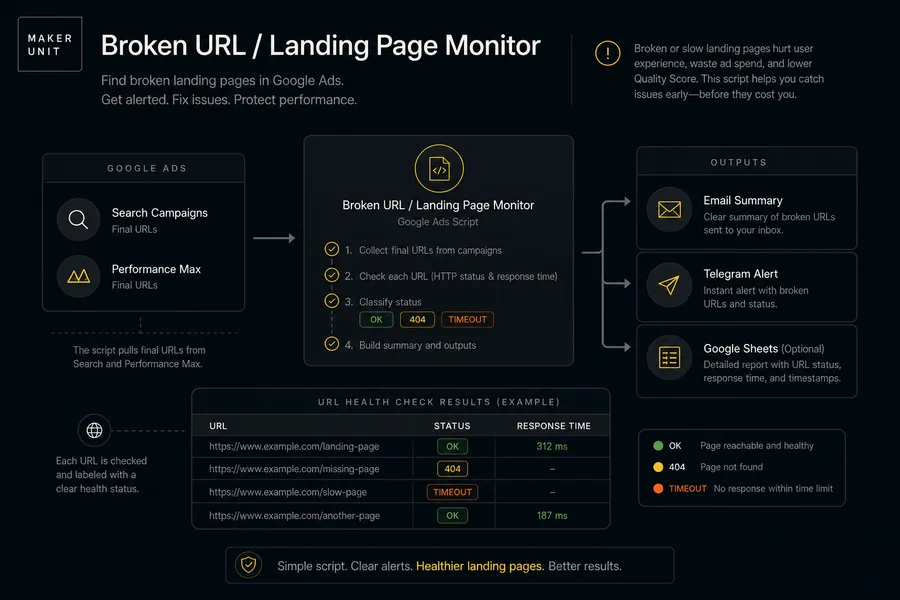
URL statuses
| Status | Meaning |
|---|---|
| OK | HTTP 200–399 returned. Landing page is reachable and responds with a success or redirect status. |
| BROKEN | HTTP 4xx, 5xx, network error, or timeout. The landing page is likely down, removed, or unreachable within the configured timeout. |
| NEEDS_REVIEW | URL responded but the script could not confirm real content — common causes: JavaScript-only redirect, login wall, soft 404, or CAPTCHA. Manual check required. |
Notification examples
Sanitized demo data — no real account credentials or client information.
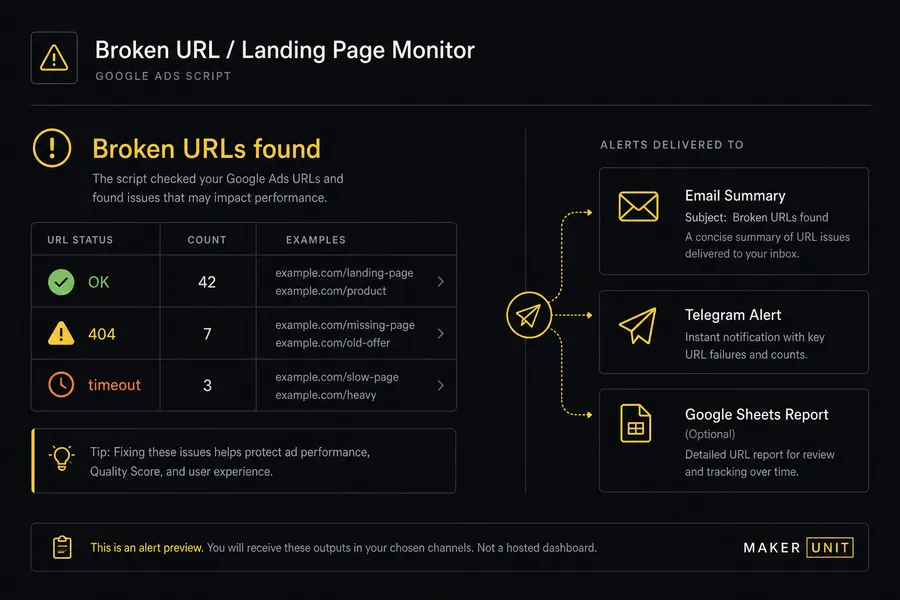
Email — one summary per run (broken URLs found)
Subject: Google Ads Alert - Broken URL / Landing Page Monitor - Check completed
Broken URL / Landing Page Monitor
Check completed
Scope: Enabled Search campaigns and enabled Performance Max surfaces
Accounts checked: 3
Objects checked: 142
Broken URLs: 2
Needs review: 1
Broken: https://example.com/promo-spring (404 Not Found) — Demo Store (123-456-7890)
Broken: https://example.com/en/product/widget (503 Service Unavailable) — Demo Store (123-456-7890)
Needs review: https://shop.example.com/checkout (login wall detected) — Agency Client (987-654-3210)
Maker Unit: https://maker-unit.com/
One email per run. Broken URLs are listed with HTTP status code and account name. NEEDS_REVIEW items include the detected reason. Full details in Google Sheets if enabled.
Email — all landing pages OK
Subject: Google Ads Alert - Broken URL / Landing Page Monitor - Check completed
Broken URL / Landing Page Monitor
Check completed
Scope: Enabled Search campaigns and enabled Performance Max surfaces
Accounts checked: 1
Objects checked: 38
Broken URLs: 0
Needs review: 0
All landing pages are reachable.
Maker Unit: https://maker-unit.com/
Every run sends one summary. You always know the script ran even when all landing pages are OK.
Telegram — one message per run
⚠️ Broken URL / Landing Page Monitor
Scope: Enabled Search campaigns and enabled Performance Max surfaces
Checked: 3 accounts, 142 objects
Broken: 2
Needs review: 1
Telegram is disabled by default. Requires a private bot token and chat ID in your installed copy. No Maker Unit branding in Telegram messages.
Google Sheets — optional, 3 sheets
Sheet 1: Current Issues (upsert per URL)
| url | url_status | http_status | customer_id | account_name | campaign_type | campaign_name | run_timestamp |
|---|---|---|---|---|---|---|---|
| https://example.com/promo | BROKEN | 404 | 123-456-7890 | Demo Store | SEARCH | Spring Sale | 2026-07-29T09:00:00Z |
Sheet 2: Event History (append-only)
| run_timestamp | event_type | previous_status | url | url_status | http_status | customer_id | campaign_type |
|---|---|---|---|---|---|---|---|
| 2026-07-29T09:00:00Z | STATUS_CHANGED | OK | https://example.com/promo | BROKEN | 404 | 123-456-7890 | SEARCH |
Sheet 3: Run Log (append-only)
| run_timestamp | mode | accounts_checked | objects_checked | broken_count | needs_review_count | email_result | telegram_result | sheets_result |
|---|---|---|---|---|---|---|---|---|
| 2026-07-29T09:00:00Z | PRODUCTION | 3 | 142 | 2 | 1 | SENT | DISABLED | UPDATED |
Current Issues keeps one row per URL (upsert — always the latest status). Event History records INITIAL_OBSERVATION and STATUS_CHANGED events only. Run Log records every run regardless of results.
Setup
- 1 Open Google Ads Scripts in your MCC or standalone account.
- 2 Create a new script and paste the full broken-url-landing-page-monitor.js code.
- 3 Fill in ACCOUNT_IDS — add each Customer ID you want to monitor.
- 4 Add your email address to EMAIL_RECIPIENTS.
- 5 Set TEST_MODE to true for your first run.
- 6 Click Preview — check the email you receive for a test summary.
- 7 (Optional) Add Telegram credentials (bot token and chat ID), run Preview again to test the message.
- 8 (Optional) Enable Google Sheets: set GOOGLE_SHEETS_ENABLED to true, add GOOGLE_SHEETS_SPREADSHEET_ID, run Preview and verify three sheets appear: Current Issues, Event History, Run Log.
- 9 Set TEST_MODE to false.
- 10 Set a daily schedule — morning is recommended so you catch broken URLs before campaigns spend budget on dead pages.
CONFIG reference
ACCOUNT_IDS string[] Customer IDs to monitor (format: '123-456-7890'). Required. Empty list means no accounts are checked.
SEARCH_ONLY boolean Set to true to skip Performance Max and check only Search ads. Default: false.
INCLUDE_PERFORMANCE_MAX boolean Keep Performance Max scanning enabled. Default: true. Automatically set to false when SEARCH_ONLY is true.
EMAIL_ENABLED boolean Send an email summary after each run. Default: true. One email per run.
EMAIL_RECIPIENTS string[] Email addresses to receive the summary. Set only in your installed copy — never commit real addresses.
TELEGRAM_ENABLED boolean Send a Telegram message after each run. Default: false. Requires TELEGRAM_BOT_TOKEN and TELEGRAM_CHAT_ID.
TELEGRAM_BOT_TOKEN string Telegram bot token from @BotFather. Set only in your private installed copy — never share or commit this value.
TELEGRAM_CHAT_ID string Telegram chat or group ID. Set only in your private installed copy.
GOOGLE_SHEETS_ENABLED boolean Log issue details to Google Sheets. Default: false. An error in Sheets does not block email or Telegram delivery.
GOOGLE_SHEETS_SPREADSHEET_ID string ID of the target Google Spreadsheet (from the URL). Set only in your private installed copy.
GOOGLE_SHEETS_CURRENT_SHEET_NAME string Tab name for the current issue registry (one row per URL, upsert). Default: 'Current Issues'.
GOOGLE_SHEETS_EVENT_HISTORY_SHEET_NAME string Tab name for the append-only issue history log. Default: 'Event History'.
GOOGLE_SHEETS_RUN_LOG_SHEET_NAME string Tab name for the append-only run log. Default: 'Run Log'.
HTTP_TIMEOUT_MS number Timeout for each URL check in milliseconds. Default: 10000 (10 s). Increase for slow or geographically distant landing pages.
MAX_URLS_IN_SUMMARY number Maximum number of broken URLs listed directly in email or Telegram. Default: 20. The full list is always available in Google Sheets if enabled.
TEST_MODE boolean Adds [TEST] prefix to notifications and skips production state writes. Default: false. Use for initial setup and verification.
BRAND_NAME string Your agency or brand name shown in the email footer. Default: 'Maker Unit'.
BRAND_URL string URL linked from the brand name in the email footer. Default: 'https://maker-unit.com'.
Limitations
- URL checks are HTTP GET requests from Google's servers — results may differ from real user experience due to CDN behavior, geo-targeting, or device-specific redirects.
- HTTP_TIMEOUT_MS caps each request; slow landing pages may be classified as BROKEN even if they eventually load for real users.
- JavaScript-heavy pages with client-side redirects are classified as NEEDS_REVIEW — the script cannot execute JavaScript.
- Login walls, IP restrictions, and CAPTCHA pages will appear as BROKEN or NEEDS_REVIEW regardless of actual content.
- Performance Max asset groups may share URLs with other surfaces that are not checked by this script.
- The script does not pause ads, campaigns, or adjust bids — it is read-only.
- Requires Google Ads Script execution permissions and read access to each monitored Customer ID.
- Large accounts with thousands of ads may approach Google Ads Script execution time limits.
Script code
'use strict';

const CONFIG = {
  // Add every Google Ads Customer ID that this script is allowed to monitor.
  ACCOUNT_IDS: [],
  // Keep Search only if you do not want to scan Performance Max surfaces yet.
  SEARCH_ONLY: false,
  // Keep Performance Max monitoring enabled by default for agencies and multi-account teams.
  INCLUDE_PERFORMANCE_MAX: true,
  // Enable Email summaries.
  EMAIL_ENABLED: true,
  // Add one or more Email addresses that should receive alerts.
  EMAIL_RECIPIENTS: [],
  // Enable Telegram only after private credentials have been added and tested.
  TELEGRAM_ENABLED: false,
  // Paste the Telegram bot token only in your private Google Ads copy.
  TELEGRAM_BOT_TOKEN: '',
  // Paste the Telegram chat ID only in your private Google Ads copy.
  TELEGRAM_CHAT_ID: '',
  // Enable optional Google Sheets logging.
  GOOGLE_SHEETS_ENABLED: false,
  // Paste the destination Spreadsheet ID only when Google Sheets is enabled.
  GOOGLE_SHEETS_SPREADSHEET_ID: '',
  // Use this sheet for the current issue registry.
  GOOGLE_SHEETS_CURRENT_SHEET_NAME: 'Current Issues',
  // Use this sheet for the append-only issue history.
  GOOGLE_SHEETS_EVENT_HISTORY_SHEET_NAME: 'Event History',
  // Use this sheet for the append-only run log.
  GOOGLE_SHEETS_RUN_LOG_SHEET_NAME: 'Run Log',
  // Safe timeout in milliseconds for landing page checks.
  HTTP_TIMEOUT_MS: 10000,
  // Limit how many broken URLs are listed directly in Email/Telegram summaries.
  MAX_URLS_IN_SUMMARY: 20,
  // Set to true for test runs without production state writes.
  TEST_MODE: false,
  // Branding shown only in the Email footer.
  BRAND_NAME: 'Maker Unit',
  // Branding shown only in the Email footer.
  BRAND_URL: 'https://maker-unit.com/'
};

function normalizeCustomerId(value) {
  return String(value == null ? '' : value).replace(/[^\d]/g, '');
}

function normalizeConfig(config) {
  return {
    accountIds: Array.isArray(config.ACCOUNT_IDS) ? config.ACCOUNT_IDS.map(normalizeCustomerId).filter(Boolean) : [],
    searchOnly: Boolean(config.SEARCH_ONLY),
    includePerformanceMax: Boolean(config.INCLUDE_PERFORMANCE_MAX) && !Boolean(config.SEARCH_ONLY),
    emailEnabled: config.EMAIL_ENABLED !== false,
    emailRecipients: Array.isArray(config.EMAIL_RECIPIENTS) ? config.EMAIL_RECIPIENTS.filter(Boolean) : [],
    telegramEnabled: Boolean(config.TELEGRAM_ENABLED),
    telegramBotToken: String(config.TELEGRAM_BOT_TOKEN || ''),
    telegramChatId: String(config.TELEGRAM_CHAT_ID || ''),
    googleSheetsEnabled: Boolean(config.GOOGLE_SHEETS_ENABLED),
    spreadsheetId: String(config.GOOGLE_SHEETS_SPREADSHEET_ID || ''),
    currentSheetName: String(config.GOOGLE_SHEETS_CURRENT_SHEET_NAME || 'Current Issues'),
    eventHistorySheetName: String(config.GOOGLE_SHEETS_EVENT_HISTORY_SHEET_NAME || 'Event History'),
    runLogSheetName: String(config.GOOGLE_SHEETS_RUN_LOG_SHEET_NAME || 'Run Log'),
    httpTimeoutMs: Number(config.HTTP_TIMEOUT_MS || 10000),
    maxUrlsInSummary: Number(config.MAX_URLS_IN_SUMMARY || 20),
    testMode: Boolean(config.TEST_MODE),
    brandName: String(config.BRAND_NAME || 'Maker Unit'),
    brandUrl: String(config.BRAND_URL || 'https://maker-unit.com/')
  };
}

function classifyUrlOutcome(outcome) {
  if (!outcome) return 'BROKEN';
  if (outcome.kind === 'http' && outcome.statusCode >= 200 && outcome.statusCode < 400) return 'OK';
  if (outcome.kind === 'needs_review') return 'NEEDS_REVIEW';
  return 'BROKEN';
}

function filterEnabledSearchInventory(rows) {
  return rows.filter((row) => row.campaignStatus === 'ENABLED' && row.channelType === 'SEARCH' && row.adGroupStatus === 'ENABLED' && row.adStatus === 'ENABLED');
}

function filterEnabledPerformanceMaxInventory(rows) {
  return rows.filter((row) => row.campaignStatus === 'ENABLED' && row.assetGroupStatus === 'ENABLED');
}

function buildSheetNames(config = CONFIG) {
  return {
    current: config.GOOGLE_SHEETS_CURRENT_SHEET_NAME || 'Current Issues',
    eventHistory: config.GOOGLE_SHEETS_EVENT_HISTORY_SHEET_NAME || 'Event History',
    runLog: config.GOOGLE_SHEETS_RUN_LOG_SHEET_NAME || 'Run Log'
  };
}

function formatEmailSummary(summary) {
  const lines = [
    `${summary.scriptName}`,
    'Check completed',
    `Scope: ${summary.scope}`,
    `Accounts checked: ${summary.checkedAccounts}`,
    `Objects checked: ${summary.checkedObjects}`,
    `Broken URLs: ${summary.brokenCount}`,
    `Needs review: ${summary.needsReviewCount}`
  ];
  if (summary.sheetsUrl) {
    lines.push(`Full report: ${summary.sheetsUrl}`);
  }
  if (summary.brandName && summary.brandUrl) {
    lines.push(`${summary.brandName}: ${summary.brandUrl}`);
  }
  return lines.join('\n');
}

function formatTelegramSummary(summary) {
  const lines = [
    `${summary.scriptName}`,
    `Scope: ${summary.scope}`,
    `Checked: ${summary.checkedAccounts} accounts, ${summary.checkedObjects} objects`,
    `Broken: ${summary.brokenCount}`,
    `Needs review: ${summary.needsReviewCount}`
  ];
  if (summary.sheetsUrl) {
    lines.push(`Report: ${summary.sheetsUrl}`);
  }
  return lines.join('\n');
}

function buildRunSummary(partial) {
  return {
    scriptName: 'Broken URL / Landing Page Monitor',
    scope: partial.scope || 'Enabled Search campaigns and enabled Performance Max surfaces',
    checkedAccounts: partial.checkedAccounts || 0,
    checkedObjects: partial.checkedObjects || 0,
    brokenCount: partial.brokenCount || 0,
    needsReviewCount: partial.needsReviewCount || 0,
    sheetsUrl: partial.sheetsUrl || '',
    brandName: partial.brandName || CONFIG.BRAND_NAME,
    brandUrl: partial.brandUrl || CONFIG.BRAND_URL
  };
}

function main() {
  const config = normalizeConfig(CONFIG);
  const summary = buildRunSummary({});
  if (config.emailEnabled) {
    MailApp.sendEmail({
      to: config.emailRecipients.join(','),
      subject: `Google Ads Alert - ${summary.scriptName} - Check completed`,
      body: formatEmailSummary(summary)
    });
  }
  return summary;
}

module.exports = {
  CONFIG,
  main,
  normalizeConfig,
  normalizeCustomerId,
  classifyUrlOutcome,
  filterEnabledSearchInventory,
  filterEnabledPerformanceMaxInventory,
  buildSheetNames,
  buildRunSummary,
  formatEmailSummary,
  formatTelegramSummary
};
Video walkthrough
FAQ
What counts as a broken URL?
Any landing page that returns an HTTP 4xx or 5xx status code, times out, or fails to connect within HTTP_TIMEOUT_MS is classified as BROKEN. This includes deleted pages (404), server errors (500–503), and forbidden access (403).
What is NEEDS_REVIEW?
NEEDS_REVIEW means the URL responded but the script could not confirm real content. Common causes: the page uses a JavaScript redirect the script cannot follow, shows a login or CAPTCHA wall, or returns a 200 status with an empty body (soft 404). These require a manual check.
Does it check every URL in the account?
No. Only enabled ads in enabled ad groups in enabled Search campaigns, and enabled asset groups in enabled Performance Max campaigns. Paused, removed, or limited objects are excluded.
Can I check Search only, without Performance Max?
Yes. Set SEARCH_ONLY to true in CONFIG. This disables Performance Max scanning and checks only Search ad final URLs. Useful for accounts where PMax URLs change frequently or are managed separately.
How often should I run it?
Daily is recommended. Set the schedule to run in the morning so you catch broken landing pages before campaigns spend significant budget on them. For high-spend accounts, consider twice daily.
Does it check final URLs or destination URLs?
Final URLs — the URL entered in the ad, before any ValueTrack parameters or tracking templates are applied. Tracking template redirects are not followed by the script.
What is the difference between Current Issues and Event History sheets?
Current Issues keeps one up-to-date row per URL (upsert) — it always reflects the current status. Event History is append-only and records every status change, so you can see when a URL went from OK to BROKEN and back.
Does the script pause ads or campaigns with broken URLs?
No. The script is read-only. It only checks URLs and sends notifications. You decide what action to take after reviewing the report.
Is Google Sheets required?
No. Google Sheets is optional and off by default. The email summary gives you counts and a list of up to MAX_URLS_IN_SUMMARY broken URLs. Enable Sheets for a full detailed log with history.
What is TEST_MODE?
TEST_MODE adds a [TEST] prefix to email subjects and Telegram messages, and skips writing to production state. Use it during initial setup to confirm the script runs and the output looks correct before going live.
Get notified when this script updates
No spam. A short email when v0.2.0 or higher drops.
No spam. Unsubscribe any time.