$ scripts --run account-budget-balance-monitor
Account Budget Balance Monitor
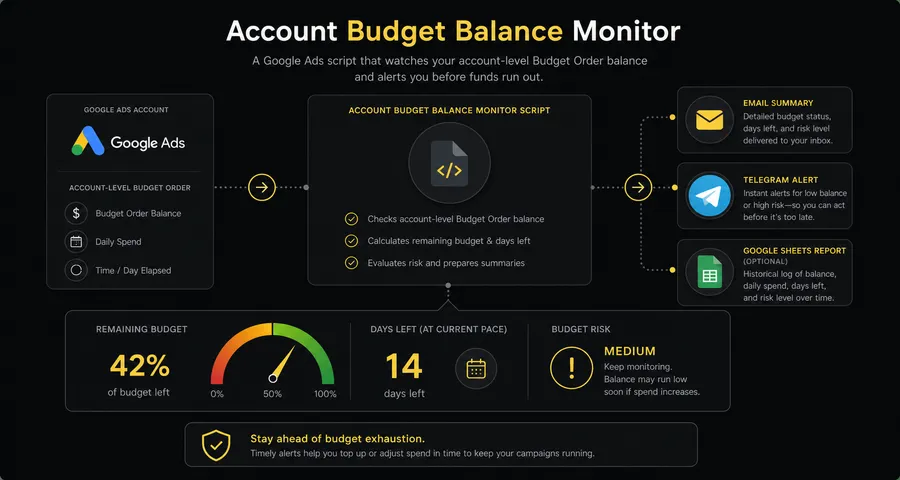
Monitor an active Google Ads Budget Order, estimate the remaining days from recent spend, and receive one concise summary across an individual account or MCC.
This script monitors an active account-level Budget Order used with consolidated billing. It does not monitor campaign budget pacing, perform top-ups, or guarantee the exact date when funds will run out.
What this script monitors
- Active Budget Order spending limit set on each monitored account.
- Account cost from the Budget Order start date through today.
- Average daily spend over a configurable recent calendar window (default: last 10 days).
- Estimated full days remaining before the balance is depleted.
- An inclusive critical threshold: estimated days left equal to or below CRITICAL_DAYS (default: 3).
- The full allowlist of Customer IDs across MCC child accounts or standalone accounts.
- Observable exceptional states — unlimited, no recent spend, no active order — without assuming a balance.
Calculation
remaining = max(spending limit − spend since Budget Order start, 0)
average daily spend = recent cost / averaging days
estimated days left = floor(remaining / average daily spend)
This is an estimate based on recent spend. Changes to bids, schedules, or campaign settings affect the actual result.
Health statuses
| Status | Meaning |
|---|---|
| CRITICAL | Estimated days left are equal to or below the configured threshold. With the default CRITICAL_DAYS: 3, estimates of 0, 1, 2, or exactly 3 days are CRITICAL; 4 days or more is OK. |
| DEPLETED | The calculated remaining amount is zero. Always grouped with CRITICAL accounts in notifications. |
| OK | Estimated days left are above the configured threshold. |
| UNLIMITED | The active Budget Order has no spending limit. No day estimate is calculated. |
| NO_RECENT_SPEND | A positive balance exists but average daily spend over the recent window is zero. A day estimate cannot be calculated. |
| NO_ACTIVE_BUDGET_ORDER | No active Budget Order was found on the account. This does not indicate a zero balance — billing may be configured differently. |
| ERROR | The account could not be checked. Reported in the summary without blocking other accounts. |
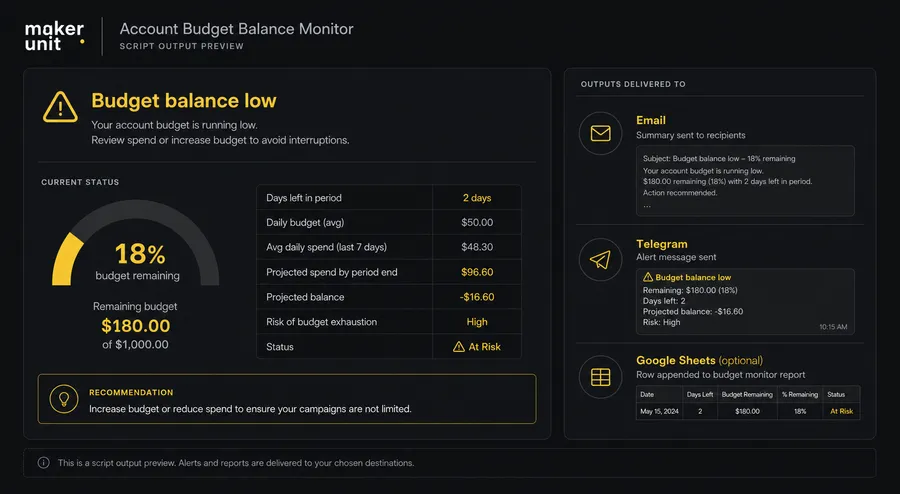
Notification examples
Sanitized demo data — no real account credentials or client information.
Email — daily summary (one per run)
Subject: Google Ads Alert - Account Budget Balance Monitor - Check completed
Account Budget Balance Monitor
Checked at 2026-08-05 09:00
Demo Store (123-456-7890)
Balance: 290 EUR
Estimated coverage: ≈2 days (avg. spend over the last 10 days)
Average daily spend: 100 EUR/day
⚠ Replenishment required
Family Store (234-567-8901)
Balance: 1,840 EUR
Estimated coverage: ≈18 days (avg. spend over the last 10 days)
Average daily spend: 100 EUR/day
Seasonal Store (345-678-9012)
Active Budget Order has no spending limit — coverage is not estimated.
Archive Store (456-789-0123)
Balance: 60 EUR
No recent spend in the last 10 days — coverage forecast unavailable.
Maker Unit: https://maker-unit.com/
Every successfully checked account is listed with its own balance, estimated coverage, and average daily spend. Only accounts with CRITICAL_DAYS or fewer estimated days left show a replenishment flag. Unlimited and no-recent-spend accounts show an explanation instead of an invented number of days. Environment and status counters are not shown here — they remain in ABB Run Log.
Email — all accounts above the threshold
Subject: Google Ads Alert - Account Budget Balance Monitor - Check completed
Account Budget Balance Monitor
Checked at 2026-08-05 09:00
Demo Store (123-456-7890)
Balance: 1,240 EUR
Estimated coverage: ≈12 days (avg. spend over the last 10 days)
Average daily spend: 100 EUR/day
All checked balances are above the 3-day alert threshold.
Maker Unit: https://maker-unit.com/
Every run sends a summary, even when nothing is critical — you always know the script ran and what it found.
Email — check failed
Subject: Google Ads Alert - Account Budget Balance Monitor - Check completed
Account Budget Balance Monitor
Checked at 2026-08-05 09:00
Check failed: no configured account was successfully checked.
Budget balance status is unknown.
Problem details:
• Demo Store (123-456-7890): authorization error
• Family Store (234-567-8901): Budget Order query failed
• Seasonal Store (345-678-9012): request timed out
Maker Unit: https://maker-unit.com/
When zero accounts are successfully checked, the notification never claims balances are fine. It states that budget status is unknown and lists up to three sanitized problem causes; the full technical error stays in ABB Run Log.
Telegram — one message per run
⚠️ Account Budget Balance Monitor
Demo Store (123-456-7890)
Balance: 290 EUR
≈2 days left · avg 100 EUR/day (10-day avg)
⚠ Replenishment required
Family Store (234-567-8901)
Balance: 1,840 EUR
≈18 days left · avg 100 EUR/day (10-day avg)
Seasonal Store (345-678-9012)
Unlimited Budget Order — no coverage estimate.
Telegram is disabled by default. Requires a private bot token and chat ID in your installed copy. Token is redacted in error messages. No Maker Unit name or site URL in Telegram; an optional Google Sheets report link is included only when Sheets is enabled. Link preview is disabled.
Large MCC — critical list is capped
When more accounts are CRITICAL or DEPLETED than MAX_CRITICAL_ACCOUNTS_IN_NOTIFICATION (default: 20) in the same run, the notification details the first accounts up to that limit and reports how many additional critical accounts are hidden. The exact total is always shown. The complete list is available in Google Sheets only if you have enabled it.
Google Sheets — optional, 3 sheets
Sheet 1: ABB Current Balances (upsert per account)
| customer_id | account_name | health_status | spending_limit | remaining | average_daily_spend | estimated_days_left | run_timestamp |
|---|---|---|---|---|---|---|---|
| 123-456-7890 | Demo Store | CRITICAL | 5000 | 290 | 100 | 2 | 2026-07-29T09:00:00Z |
Sheet 2: ABB Event History (append-only)
| run_timestamp | event_type | previous_status | customer_id | account_name | health_status | remaining | average_daily_spend | estimated_days_left |
|---|---|---|---|---|---|---|---|---|
| 2026-07-29T09:00:00Z | STATUS_CHANGED | OK | 123-456-7890 | Demo Store | CRITICAL | 290 | 100 | 2 |
Sheet 3: ABB Run Log (append-only)
| run_timestamp | mode | environment | accounts_requested | accounts_checked | critical_or_depleted | ok | unlimited | errors | email_result | telegram_result | sheets_result |
|---|---|---|---|---|---|---|---|---|---|---|---|
| 2026-07-29T09:00:00Z | PRODUCTION | MCC | 5 | 5 | 1 | 3 | 1 | 0 | SENT | DISABLED | UPDATED |
Google Sheets is optional. ABB Current Balances keeps one up-to-date row per Customer ID (upsert). ABB Event History records INITIAL_OBSERVATION and STATUS_CHANGED events only — repeated runs with the same status do not create duplicate rows. ABB Run Log records every run. TEST_MODE creates sheet headers and one TEST row in ABB Run Log; ABB Current Balances and ABB Event History are not modified.
Installation
- 1 Open Google Ads → Tools → Bulk actions → Scripts (or MCC Scripts for MCC accounts).
- 2 Click New script and paste the complete release artifact.
- 3 In the CONFIG block at the top, add your allowed Customer IDs to ACCOUNT_IDS.
- 4 Set EMAIL_RECIPIENTS to one or more recipient email addresses.
- 5 Leave TELEGRAM_ENABLED: false and GOOGLE_SHEETS_ENABLED: false for the initial test.
- 6 Set TEST_MODE: true.
- 7 Authorize access — Google Ads read access is required for all runs.
- 8 Run Preview and compare the account name, spending limit, start date, and recent spend against your Google Ads Billing → Budget Orders view.
- 9 Verify the [TEST] summary email arrives with the correct balance, estimated coverage, and average daily spend for each account.
- 10 Test Telegram separately by setting TELEGRAM_ENABLED: true after the bot token and chat ID are configured in your private installed copy.
- 11 Enable optional Google Sheets by setting GOOGLE_SHEETS_ENABLED: true and providing a valid GOOGLE_SHEETS_SPREADSHEET_ID. Run Preview to verify the three sheets are created with correct headers and one TEST row in ABB Run Log.
- 12 Set TEST_MODE: false.
- 13 Configure a daily schedule (recommended: 09:00 in your account timezone).
CONFIG reference
ACCOUNT_IDS string[] Allowlist of Google Ads Customer IDs to monitor. Required for both MCC and standalone mode. In standalone mode, must include the current account's ID.
CRITICAL_DAYS number Remaining-days threshold. Estimated days left equal to or below this value triggers CRITICAL (inclusive). Default: 3.
AVERAGING_DAYS number Inclusive calendar-day window used to calculate average daily spend. Default: 10.
MAX_CRITICAL_ACCOUNTS_IN_NOTIFICATION number Maximum number of CRITICAL or DEPLETED accounts shown in detail in each notification. Total count is always reported. Default: 20.
NOTIFICATION_LANGUAGE string Language for notification labels. Supported values: 'en' (English) or 'uk' (Ukrainian). Default: 'en'.
EMAIL_ENABLED boolean Enables one Email summary per run. Default: true.
EMAIL_RECIPIENTS string[] One or more email addresses to receive the run summary. Required when EMAIL_ENABLED is true.
TELEGRAM_ENABLED boolean Enables one Telegram message per run. Default: false. Enable only after credentials are configured and tested in your private copy.
TELEGRAM_BOT_TOKEN string Telegram bot token. Set only in your private installed copy — never share or commit this value.
TELEGRAM_CHAT_ID string Destination Telegram chat or group ID. Set only in your private installed copy.
GOOGLE_SHEETS_ENABLED boolean Enables the optional detailed Google Sheets report. Default: false. The script runs fully without it.
GOOGLE_SHEETS_SPREADSHEET_ID string ID of an existing Google Spreadsheet the authorized user can write to. Required only when GOOGLE_SHEETS_ENABLED is true.
GOOGLE_SHEETS_CURRENT_SHEET_NAME string Worksheet name for the current balance snapshot. One row per Customer ID, upserted on each run. Default: 'ABB Current Balances'.
GOOGLE_SHEETS_EVENT_HISTORY_SHEET_NAME string Worksheet name for the append-only status-change history. Rows are added on INITIAL_OBSERVATION and STATUS_CHANGED events only. Default: 'ABB Event History'.
GOOGLE_SHEETS_RUN_LOG_SHEET_NAME string Worksheet name for the append-only run log. One row per script execution with counts and delivery results. Default: 'ABB Run Log'.
TEST_MODE boolean Sends [TEST]-prefixed notifications and creates Sheets structure with one TEST row in ABB Run Log, but does not save production state or write to ABB Current Balances or ABB Event History. Default: false. Use true for initial verification.
BRAND_NAME string Sender label shown at the bottom of Email notifications only. Default: 'Maker Unit'.
BRAND_URL string Branding link included at the bottom of Email notifications only.
Limitations
- Budget Orders are used for account-level consolidated billing — this script is not a universal prepaid or payment balance check.
- The absence of an active Budget Order does not indicate a zero balance; billing may be configured differently.
- Average daily spend is based on a calendar window and does not guarantee future spend.
- Changes to bids, targeting, schedules, and campaigns affect the actual remaining duration.
- Large MCC accounts may approach the Google Ads Scripts execution quota.
- Email, Telegram, and Google Sheets delivery depend on external services and authorized permissions.
- Script state is stored in Script Properties of your installed copy and is not shared between copies.
- The script does not change budgets, submit top-ups, or make any modifications to your Google Ads account.
Script code
'use strict';
const CONFIG = {
// Add every Google Ads Customer ID that this script is allowed to monitor.
ACCOUNT_IDS: ['123-456-7890'],
// Alert when the estimated days left are equal to or below this number.
CRITICAL_DAYS: 3,
// Set the number of calendar days used to calculate average daily spend.
AVERAGING_DAYS: 10,
// Limit how many critical accounts are detailed in each notification.
MAX_CRITICAL_ACCOUNTS_IN_NOTIFICATION: 20,
// Use 'en' for English notifications or 'uk' for Ukrainian notifications.
NOTIFICATION_LANGUAGE: 'en',
// Set to true to send one Email summary per run or false to disable Email.
EMAIL_ENABLED: true,
// Add one or more Email addresses that should receive summaries.
EMAIL_RECIPIENTS: ['name@example.com'],
// Set to true only after Telegram credentials have been added and tested.
TELEGRAM_ENABLED: false,
// Paste the Telegram bot token here only in your private Google Ads copy.
TELEGRAM_BOT_TOKEN: '',
// Paste the Telegram chat ID here only in your private Google Ads copy.
TELEGRAM_CHAT_ID: '',
// Set to true to write the optional detailed Google Sheets report.
GOOGLE_SHEETS_ENABLED: false,
// Paste the destination Spreadsheet ID only when Google Sheets is enabled.
GOOGLE_SHEETS_SPREADSHEET_ID: '',
// Set the namespaced sheet name used for current account balances.
GOOGLE_SHEETS_CURRENT_SHEET_NAME: 'ABB Current Balances',
// Set the namespaced sheet name used for append-only status changes.
GOOGLE_SHEETS_EVENT_HISTORY_SHEET_NAME: 'ABB Event History',
// Set the namespaced sheet name used for append-only run results.
GOOGLE_SHEETS_RUN_LOG_SHEET_NAME: 'ABB Run Log',
// Set to true for test summaries without production state or event writes.
TEST_MODE: false,
// Set the site name shown only in the Email footer.
BRAND_NAME: 'Maker Unit',
// Set the site link shown only in the Email footer.
BRAND_URL: 'https://maker-unit.com/'
};
const SCRIPT_ID = 'mus-account-budget-balance-monitor';
const SCRIPT_VERSION = '0.2.0';
const STATE_PREFIX = SCRIPT_ID + ':state:';
function normalizeCustomerId(value) {
return String(value == null ? '' : value).replace(/[\s-]/g, '');
}
function formatCustomerId(value) {
return normalizeCustomerId(value).replace(
/^(\d{3})(\d{3})(\d{4})$/,
'$1-$2-$3'
);
}
function normalizeCustomerIdList(values) {
if (!Array.isArray(values) || values.length === 0) {
throw new Error('ACCOUNT_IDS must contain at least one Customer ID.');
}
const normalized = values.map(function (value) {
const customerId = normalizeCustomerId(value);
if (!/^\d{10}$/.test(customerId)) {
throw new Error('ACCOUNT_IDS contains an invalid Customer ID.');
}
return customerId;
});
if (new Set(normalized).size !== normalized.length) {
throw new Error('ACCOUNT_IDS must not contain duplicate Customer IDs.');
}
return normalized;
}
function isPositiveInteger(value) {
return Number.isInteger(value) && value > 0;
}
function validateConfig(config) {
const accountIds = normalizeCustomerIdList(config.ACCOUNT_IDS);
if (!isPositiveInteger(config.CRITICAL_DAYS)) {
throw new Error('CRITICAL_DAYS must be a positive integer.');
}
if (!isPositiveInteger(config.AVERAGING_DAYS)) {
throw new Error('AVERAGING_DAYS must be a positive integer.');
}
if (!isPositiveInteger(config.MAX_CRITICAL_ACCOUNTS_IN_NOTIFICATION)) {
throw new Error(
'MAX_CRITICAL_ACCOUNTS_IN_NOTIFICATION must be a positive integer.'
);
}
if (['en', 'uk'].indexOf(config.NOTIFICATION_LANGUAGE) < 0) {
throw new Error('NOTIFICATION_LANGUAGE supports en and uk only.');
}
if (
config.EMAIL_ENABLED &&
(
!Array.isArray(config.EMAIL_RECIPIENTS) ||
config.EMAIL_RECIPIENTS.length === 0 ||
config.EMAIL_RECIPIENTS.some(function (recipient) {
return typeof recipient !== 'string' || recipient.trim() === '';
})
)
) {
throw new Error(
'EMAIL_RECIPIENTS must contain at least one recipient when Email is enabled.'
);
}
if (
config.TELEGRAM_ENABLED &&
(
typeof config.TELEGRAM_BOT_TOKEN !== 'string' ||
config.TELEGRAM_BOT_TOKEN.trim() === '' ||
typeof config.TELEGRAM_CHAT_ID !== 'string' ||
config.TELEGRAM_CHAT_ID.trim() === ''
)
) {
throw new Error('TELEGRAM configuration is incomplete.');
}
if (
config.GOOGLE_SHEETS_ENABLED &&
(
typeof config.GOOGLE_SHEETS_SPREADSHEET_ID !== 'string' ||
config.GOOGLE_SHEETS_SPREADSHEET_ID.trim() === ''
)
) {
throw new Error(
'GOOGLE_SHEETS_SPREADSHEET_ID is required when Google Sheets is enabled.'
);
}
const sheetNameSettings = [
'GOOGLE_SHEETS_CURRENT_SHEET_NAME',
'GOOGLE_SHEETS_EVENT_HISTORY_SHEET_NAME',
'GOOGLE_SHEETS_RUN_LOG_SHEET_NAME'
];
if (sheetNameSettings.some(function (settingName) {
return (
typeof config[settingName] !== 'string' ||
config[settingName].trim() === ''
);
})) {
throw new Error('All Google Sheets names must not be empty.');
}
return {
accountIds,
notificationLanguage: config.NOTIFICATION_LANGUAGE
};
}
function budgetHealthResult(status, values) {
const details = values || {};
return {
healthStatus: status,
remaining: Object.prototype.hasOwnProperty.call(details, 'remaining')
? details.remaining
: null,
averageDailySpend: Object.prototype.hasOwnProperty.call(
details,
'averageDailySpend'
) ? details.averageDailySpend : null,
estimatedDaysLeft: Object.prototype.hasOwnProperty.call(
details,
'estimatedDaysLeft'
) ? details.estimatedDaysLeft : null
};
}
function calculateBudgetHealth(input) {
if (!input.hasActiveBudgetOrder) {
return budgetHealthResult('NO_ACTIVE_BUDGET_ORDER');
}
if (input.spendingLimit == null) {
return budgetHealthResult('UNLIMITED');
}
const remaining = Math.max(
Number(input.spendingLimit) - Number(input.spentSinceStart),
0
);
const averageDailySpend =
Number(input.recentCost) / Number(input.averagingDays);
if (remaining === 0) {
return budgetHealthResult('DEPLETED', {
remaining,
averageDailySpend,
estimatedDaysLeft: 0
});
}
if (averageDailySpend === 0) {
return budgetHealthResult('NO_RECENT_SPEND', {
remaining,
averageDailySpend,
estimatedDaysLeft: null
});
}
const estimatedDaysLeft = Math.floor(remaining / averageDailySpend);
return budgetHealthResult(
estimatedDaysLeft <= Number(input.criticalDays) ? 'CRITICAL' : 'OK',
{
remaining,
averageDailySpend,
estimatedDaysLeft
}
);
}
function validStoredHealth(value) {
return (
value &&
typeof value === 'object' &&
typeof value.healthStatus === 'string'
) ? value : null;
}
function compareHealthState(previous, current) {
const stored = validStoredHealth(previous);
const eventType = !stored
? 'INITIAL_OBSERVATION'
: stored.healthStatus !== current.healthStatus
? 'STATUS_CHANGED'
: null;
return {
eventType,
previousStatus: stored ? stored.healthStatus : null,
currentStatus: current.healthStatus
};
}
function compactYmd(year, month, day) {
return String(year) +
String(month).padStart(2, '0') +
String(day).padStart(2, '0');
}
function subtractDaysCompactYmd(value, days) {
const match = /^(\d{4})(\d{2})(\d{2})$/.exec(String(value));
if (!match) {
throw new Error('Date must use YYYYMMDD format.');
}
const date = new Date(Date.UTC(
Number(match[1]),
Number(match[2]) - 1,
Number(match[3])
));
date.setUTCDate(date.getUTCDate() - Number(days));
return compactYmd(
date.getUTCFullYear(),
date.getUTCMonth() + 1,
date.getUTCDate()
);
}
function queryCurrentAccount(config) {
const account = AdsApp.currentAccount();
const customerId = normalizeCustomerId(account.getCustomerId());
const base = {
customerId,
accountName: String(account.getName() || ''),
currency: String(account.getCurrencyCode() || ''),
budgetOrderId: '',
budgetOrderName: '',
spendingLimit: null,
spentSinceStart: null,
recentCost: null,
observedAt: new Date().toISOString()
};
const iterator = AdsApp.budgetOrders()
.withCondition('Status = ACTIVE')
.get();
if (!iterator.hasNext()) {
return Object.assign(
{},
base,
calculateBudgetHealth({
hasActiveBudgetOrder: false,
spendingLimit: null,
spentSinceStart: 0,
recentCost: 0,
averagingDays: config.AVERAGING_DAYS,
criticalDays: config.CRITICAL_DAYS
})
);
}
const order = iterator.next();
const spendingLimit = order.getSpendingLimit();
base.budgetOrderId = String(order.getId());
base.budgetOrderName = String(order.getName() || '');
base.spendingLimit = spendingLimit == null
? null
: Number(spendingLimit);
if (spendingLimit == null) {
return Object.assign(
{},
base,
calculateBudgetHealth({
hasActiveBudgetOrder: true,
spendingLimit: null,
spentSinceStart: 0,
recentCost: 0,
averagingDays: config.AVERAGING_DAYS,
criticalDays: config.CRITICAL_DAYS
})
);
}
const start = order.getStartDateTime();
const startDate = compactYmd(start.year, start.month, start.day);
const today = Utilities.formatDate(
new Date(),
account.getTimeZone(),
'yyyyMMdd'
);
const recentStart = subtractDaysCompactYmd(
today,
config.AVERAGING_DAYS - 1
);
const spentSinceStart = Number(
account.getStatsFor(startDate, today).getCost()
);
const recentCost = Number(
account.getStatsFor(recentStart, today).getCost()
);
base.spentSinceStart = spentSinceStart;
base.recentCost = recentCost;
return Object.assign(
{},
base,
calculateBudgetHealth({
hasActiveBudgetOrder: true,
spendingLimit: Number(spendingLimit),
spentSinceStart,
recentCost,
averagingDays: config.AVERAGING_DAYS,
criticalDays: config.CRITICAL_DAYS
})
);
}
const TEXT = {
en: {
completed: 'Budget balance check completed',
failed: 'Budget balance check failed',
runSection: 'Run',
resultSection: 'Result',
criticalSection: 'Accounts requiring replenishment',
environment: 'Run environment',
environmentMcc: 'Google Ads manager account (MCC)',
environmentStandalone: 'Standalone Google Ads account',
requested: 'Accounts configured for this run',
checked: 'Accounts successfully checked',
critical: 'Need replenishment',
criticalRule: 'depleted or {days} days left or less',
ok: 'Balance sufficient',
okRule: 'more than {days} days left',
unlimited: 'Active Budget Order without a spending limit',
noSpend: 'No spend during the last {days} days',
noOrder: 'No active Budget Order found',
errors: 'Problems during account checks or report delivery',
checkFailed: 'Check failed: no configured account was successfully checked.',
statusUnknown: 'Budget balance status is unknown.',
errorDetails: 'Problem details',
moreErrors: 'more problems not shown',
replenishment: 'Replenishment required',
remaining: 'Remaining',
daily: 'Average daily spend',
days: 'Estimated days left',
more: 'more critical accounts not shown',
none: 'No successfully checked accounts require replenishment.',
report: 'Full report',
checkedAt: 'Checked',
balance: 'Balance',
coverage: 'Estimated coverage',
averageSpend: 'Average spend',
day: 'day',
daysUnit: 'days',
perDay: 'day',
calendarDays: 'last {days} calendar days',
allHealthy: 'All checked balances are above the {days}-day alert threshold.',
noSpendForecast: 'No spend during the last {days} calendar days; coverage cannot be estimated.',
unlimitedForecast: 'No spending limit is set for the active Budget Order.',
noOrderForecast: 'No active Budget Order found; balance cannot be calculated.',
moreAccounts: 'more accounts not shown'
},
uk: {
completed: 'Перевірку завершено',
requested: 'Акаунтів запитано',
checked: 'Акаунтів перевірено',
critical: 'Критичні або вичерпані',
ok: 'Акаунтів у нормі',
unlimited: 'Без ліміту',
noSpend: 'Немає нещодавніх витрат',
noOrder: 'Немає активного Budget Order',
errors: 'Помилки',
replenishment: 'Потрібне поповнення',
remaining: 'Залишок',
daily: 'Середні витрати на день',
days: 'Орієнтовно днів залишилось',
more: 'критичних акаунтів не показано',
none: 'Немає акаунтів, які потребують поповнення.',
report: 'Повний звіт'
}
};
const TEXT_EXTENSIONS = {
uk: {
failed: '\u041f\u0435\u0440\u0435\u0432\u0456\u0440\u043a\u0443 \u0431\u0430\u043b\u0430\u043d\u0441\u0443 \u0431\u044e\u0434\u0436\u0435\u0442\u0443 \u043d\u0435 \u0432\u0438\u043a\u043e\u043d\u0430\u043d\u043e',
runSection: '\u0417\u0430\u043f\u0443\u0441\u043a',
resultSection: '\u0420\u0435\u0437\u0443\u043b\u044c\u0442\u0430\u0442',
criticalSection: '\u0410\u043a\u0430\u0443\u043d\u0442\u0438, \u0449\u043e \u043f\u043e\u0442\u0440\u0435\u0431\u0443\u044e\u0442\u044c \u043f\u043e\u043f\u043e\u0432\u043d\u0435\u043d\u043d\u044f',
environment: '\u0421\u0435\u0440\u0435\u0434\u043e\u0432\u0438\u0449\u0435 \u0437\u0430\u043f\u0443\u0441\u043a\u0443',
environmentMcc: '\u041a\u0435\u0440\u0443\u044e\u0447\u0438\u0439 \u0430\u043a\u0430\u0443\u043d\u0442 Google Ads (MCC)',
environmentStandalone: '\u041e\u043a\u0440\u0435\u043c\u0438\u0439 \u0430\u043a\u0430\u0443\u043d\u0442 Google Ads',
requested: '\u0410\u043a\u0430\u0443\u043d\u0442\u0456\u0432 \u043d\u0430\u043b\u0430\u0448\u0442\u043e\u0432\u0430\u043d\u043e \u0434\u043b\u044f \u0446\u044c\u043e\u0433\u043e \u0437\u0430\u043f\u0443\u0441\u043a\u0443',
checked: '\u0410\u043a\u0430\u0443\u043d\u0442\u0456\u0432 \u0443\u0441\u043f\u0456\u0448\u043d\u043e \u043f\u0435\u0440\u0435\u0432\u0456\u0440\u0435\u043d\u043e',
critical: '\u041f\u043e\u0442\u0440\u0456\u0431\u043d\u0435 \u043f\u043e\u043f\u043e\u0432\u043d\u0435\u043d\u043d\u044f',
criticalRule: '\u0432\u0438\u0447\u0435\u0440\u043f\u0430\u043d\u043e \u0430\u0431\u043e \u0437\u0430\u043b\u0438\u0448\u0438\u043b\u043e\u0441\u044f {days} \u0434\u043d\u0456\u0432 \u0447\u0438 \u043c\u0435\u043d\u0448\u0435',
ok: '\u0411\u0430\u043b\u0430\u043d\u0441\u0443 \u0434\u043e\u0441\u0442\u0430\u0442\u043d\u044c\u043e',
okRule: '\u0437\u0430\u043b\u0438\u0448\u0438\u043b\u043e\u0441\u044f \u0431\u0456\u043b\u044c\u0448\u0435 {days} \u0434\u043d\u0456\u0432',
unlimited: '\u0410\u043a\u0442\u0438\u0432\u043d\u0438\u0439 Budget Order \u0431\u0435\u0437 \u043b\u0456\u043c\u0456\u0442\u0443 \u0432\u0438\u0442\u0440\u0430\u0442',
noSpend: '\u041d\u0435\u043c\u0430\u0454 \u0432\u0438\u0442\u0440\u0430\u0442 \u0437\u0430 \u043e\u0441\u0442\u0430\u043d\u043d\u0456 {days} \u0434\u043d\u0456\u0432',
noOrder: '\u0410\u043a\u0442\u0438\u0432\u043d\u0438\u0439 Budget Order \u043d\u0435 \u0437\u043d\u0430\u0439\u0434\u0435\u043d\u043e',
errors: '\u041f\u0440\u043e\u0431\u043b\u0435\u043c \u043f\u0456\u0434 \u0447\u0430\u0441 \u043f\u0435\u0440\u0435\u0432\u0456\u0440\u043a\u0438 \u0430\u043a\u0430\u0443\u043d\u0442\u0456\u0432 \u0430\u0431\u043e \u0434\u043e\u0441\u0442\u0430\u0432\u043a\u0438 \u0437\u0432\u0456\u0442\u0443',
checkFailed: '\u041f\u0435\u0440\u0435\u0432\u0456\u0440\u043a\u0443 \u043d\u0435 \u0432\u0438\u043a\u043e\u043d\u0430\u043d\u043e: \u0436\u043e\u0434\u0435\u043d \u043d\u0430\u043b\u0430\u0448\u0442\u043e\u0432\u0430\u043d\u0438\u0439 \u0430\u043a\u0430\u0443\u043d\u0442 \u043d\u0435 \u0431\u0443\u043b\u043e \u0443\u0441\u043f\u0456\u0448\u043d\u043e \u043f\u0435\u0440\u0435\u0432\u0456\u0440\u0435\u043d\u043e.',
statusUnknown: '\u0421\u0442\u0430\u043d \u0431\u0430\u043b\u0430\u043d\u0441\u0443 \u0431\u044e\u0434\u0436\u0435\u0442\u0443 \u043d\u0435\u0432\u0456\u0434\u043e\u043c\u0438\u0439.',
errorDetails: '\u0414\u0435\u0442\u0430\u043b\u0456 \u043f\u0440\u043e\u0431\u043b\u0435\u043c',
moreErrors: '\u0456\u043d\u0448\u0438\u0445 \u043f\u0440\u043e\u0431\u043b\u0435\u043c \u043d\u0435 \u043f\u043e\u043a\u0430\u0437\u0430\u043d\u043e',
none: '\u0416\u043e\u0434\u0435\u043d \u0437 \u0443\u0441\u043f\u0456\u0448\u043d\u043e \u043f\u0435\u0440\u0435\u0432\u0456\u0440\u0435\u043d\u0438\u0445 \u0430\u043a\u0430\u0443\u043d\u0442\u0456\u0432 \u043d\u0435 \u043f\u043e\u0442\u0440\u0435\u0431\u0443\u0454 \u043f\u043e\u043f\u043e\u0432\u043d\u0435\u043d\u043d\u044f.',
checkedAt: '\u041f\u0435\u0440\u0435\u0432\u0456\u0440\u0435\u043d\u043e',
balance: '\u0417\u0430\u043b\u0438\u0448\u043e\u043a',
coverage: '\u041e\u0440\u0456\u0454\u043d\u0442\u043e\u0432\u043d\u043e \u0432\u0438\u0441\u0442\u0430\u0447\u0438\u0442\u044c',
averageSpend: '\u0421\u0435\u0440\u0435\u0434\u043d\u0456 \u0432\u0438\u0442\u0440\u0430\u0442\u0438',
day: '\u0434\u0435\u043d\u044c',
daysUnit: '\u0434\u043d\u0456\u0432',
perDay: '\u0434\u0435\u043d\u044c',
calendarDays: '\u0437\u0430 \u043e\u0441\u0442\u0430\u043d\u043d\u0456 {days} \u043a\u0430\u043b\u0435\u043d\u0434\u0430\u0440\u043d\u0438\u0445 \u0434\u043d\u0456\u0432',
allHealthy: '\u0423\u0441\u0456 \u043f\u0435\u0440\u0435\u0432\u0456\u0440\u0435\u043d\u0456 \u0431\u0430\u043b\u0430\u043d\u0441\u0438 \u0432\u0438\u0449\u0435 \u043f\u043e\u0440\u043e\u0433\u0443 \u043f\u043e\u043f\u0435\u0440\u0435\u0434\u0436\u0435\u043d\u043d\u044f {days} \u0434\u043d\u0456.',
noSpendForecast: '\u0417\u0430 \u043e\u0441\u0442\u0430\u043d\u043d\u0456 {days} \u043a\u0430\u043b\u0435\u043d\u0434\u0430\u0440\u043d\u0438\u0445 \u0434\u043d\u0456\u0432 \u0432\u0438\u0442\u0440\u0430\u0442 \u043d\u0435 \u0431\u0443\u043b\u043e; \u043f\u0440\u043e\u0433\u043d\u043e\u0437 \u043d\u0435\u043c\u043e\u0436\u043b\u0438\u0432\u0438\u0439.',
unlimitedForecast: '\u0414\u043b\u044f \u0430\u043a\u0442\u0438\u0432\u043d\u043e\u0433\u043e Budget Order \u043d\u0435 \u0432\u0441\u0442\u0430\u043d\u043e\u0432\u043b\u0435\u043d\u043e \u043b\u0456\u043c\u0456\u0442 \u0432\u0438\u0442\u0440\u0430\u0442.',
noOrderForecast: '\u0410\u043a\u0442\u0438\u0432\u043d\u0438\u0439 Budget Order \u043d\u0435 \u0437\u043d\u0430\u0439\u0434\u0435\u043d\u043e; \u0431\u0430\u043b\u0430\u043d\u0441 \u043d\u0435 \u0440\u043e\u0437\u0440\u0430\u0445\u043e\u0432\u0430\u043d\u043e.',
moreAccounts: '\u0456\u043d\u0448\u0438\u0445 \u0430\u043a\u0430\u0443\u043d\u0442\u0456\u0432 \u043d\u0435 \u043f\u043e\u043a\u0430\u0437\u0430\u043d\u043e'
}
};
function notificationText(language) {
return Object.assign(
{},
TEXT.en,
TEXT[language] || {},
TEXT_EXTENSIONS[language] || {}
);
}
function countStatus(results, statuses) {
return results.filter(function (result) {
return statuses.indexOf(result.healthStatus) >= 0;
}).length;
}
function sortCritical(left, right) {
const leftDays = left.estimatedDaysLeft == null
? Number.MAX_SAFE_INTEGER
: left.estimatedDaysLeft;
const rightDays = right.estimatedDaysLeft == null
? Number.MAX_SAFE_INTEGER
: right.estimatedDaysLeft;
return leftDays - rightDays ||
String(left.accountName).localeCompare(String(right.accountName));
}
function buildRunModel(summary, reportResult, config) {
const results = (summary.results || []).slice();
const allCritical = results.filter(function (result) {
return ['CRITICAL', 'DEPLETED'].indexOf(result.healthStatus) >= 0;
}).sort(sortCritical);
const limit = config.MAX_CRITICAL_ACCOUNTS_IN_NOTIFICATION;
const criticalAccounts = allCritical.slice(0, limit);
const nonCriticalAccounts = results.filter(function (result) {
return ['CRITICAL', 'DEPLETED'].indexOf(result.healthStatus) < 0;
}).sort(function (left, right) {
return String(left.accountName).localeCompare(String(right.accountName));
});
return {
scriptName: 'Account Budget Balance Monitor',
isTest: Boolean(config.TEST_MODE),
language: config.NOTIFICATION_LANGUAGE,
environment: summary.environment,
runTimestamp: summary.runTimestamp,
requestedAccounts: Number(summary.requestedAccounts || 0),
checkedAccounts: Number(summary.checkedAccounts || 0),
criticalDays: Number(config.CRITICAL_DAYS),
averagingDays: Number(config.AVERAGING_DAYS),
counts: {
critical: allCritical.length,
ok: countStatus(results, ['OK']),
unlimited: countStatus(results, ['UNLIMITED']),
noRecentSpend: countStatus(results, ['NO_RECENT_SPEND']),
noActiveOrder: countStatus(results, ['NO_ACTIVE_BUDGET_ORDER']),
errors: (summary.errors || []).length
},
accounts: criticalAccounts.concat(nonCriticalAccounts),
criticalAccounts,
hiddenCriticalCount: Math.max(allCritical.length - limit, 0),
errors: (summary.errors || []).slice(0, 3).map(function (error) {
return {
customerId: normalizeCustomerId(error.customerId),
message: String(error.message || 'Unknown error').slice(0, 300)
};
}),
hiddenErrorCount: Math.max((summary.errors || []).length - 3, 0),
reportUrl: reportResult && reportResult.enabled && reportResult.ok
? String(reportResult.url || '')
: '',
reportWarning: Boolean(
reportResult && reportResult.enabled && !reportResult.ok
),
brandName: String(config.BRAND_NAME),
brandUrl: String(config.BRAND_URL)
};
}
function replaceDays(template, days) {
return String(template).replace('{days}', String(days));
}
function environmentLabel(environment, text) {
return environment === 'MCC'
? text.environmentMcc
: text.environmentStandalone;
}
function appendErrorDetails(lines, model, text) {
if (model.errors.length === 0) {
return;
}
lines.push('', text.errorDetails);
model.errors.forEach(function (error) {
const prefix = error.customerId
? formatCustomerId(error.customerId) + ': '
: '';
lines.push('\u2022 ' + prefix + error.message);
});
if (model.hiddenErrorCount > 0) {
lines.push(
'\u2022 ' + String(model.hiddenErrorCount) + ' ' +
text.moreErrors + '.'
);
}
}
function formatMoney(value) {
if (value == null || !Number.isFinite(Number(value))) {
return '—';
}
return Number(value).toFixed(0).replace(/\B(?=(\d{3})+(?!\d))/g, ' ');
}
function formatRunTimestamp(value) {
const timestamp = String(value || '');
if (!timestamp) {
return '\u2014';
}
const match = timestamp.match(
/^(\d{4})-(\d{2})-(\d{2})T(\d{2}):(\d{2})/
);
if (!match) {
return timestamp;
}
return match[3] + '.' + match[2] + '.' + match[1] + ' ' +
match[4] + ':' + match[5] + ' UTC';
}
function accountTitle(account) {
const warning = ['CRITICAL', 'DEPLETED'].indexOf(account.healthStatus) >= 0
? '\u26a0\ufe0f '
: '';
return warning + String(
account.accountName || formatCustomerId(account.customerId)
);
}
function accountStatusLines(account, model, text) {
const currency = String(account.currency || '');
const moneySuffix = currency ? ' ' + currency : '';
if (account.healthStatus === 'NO_ACTIVE_BUDGET_ORDER') {
return [text.noOrderForecast];
}
if (account.healthStatus === 'UNLIMITED') {
return [text.unlimitedForecast];
}
const lines = [
text.balance + ': ' + formatMoney(account.remaining) + moneySuffix
];
if (account.healthStatus === 'NO_RECENT_SPEND') {
lines.push(
text.averageSpend + ': 0' + moneySuffix + '/' + text.perDay +
' (' + replaceDays(text.calendarDays, model.averagingDays) + ')',
replaceDays(text.noSpendForecast, model.averagingDays)
);
return lines;
}
const days = Number(account.estimatedDaysLeft || 0);
lines.push(
text.coverage + ': \u2248' + days + ' ' +
(days === 1 ? text.day : text.daysUnit),
text.averageSpend + ': ' + formatMoney(account.averageDailySpend) +
moneySuffix + '/' + text.perDay +
' (' + replaceDays(text.calendarDays, model.averagingDays) + ')'
);
if (['CRITICAL', 'DEPLETED'].indexOf(account.healthStatus) >= 0) {
lines.push(text.replenishment + '.');
}
return lines;
}
function allBalancesHealthy(model) {
return model.checkedAccounts > 0 &&
model.counts.ok === model.checkedAccounts &&
model.counts.errors === 0;
}
function escapeHtml(value) {
return String(value == null ? '' : value)
.replace(/&/g, '&')
.replace(/</g, '<')
.replace(/>/g, '>')
.replace(/"/g, '"')
.replace(/'/g, ''');
}
function runLines(model) {
const text = notificationText(model.language);
const failed = model.checkedAccounts === 0;
const lines = [
model.scriptName,
failed
? text.failed
: (model.counts.critical > 0 ? text.replenishment : text.completed),
text.checkedAt + ': ' + formatRunTimestamp(model.runTimestamp)
];
if (failed) {
appendErrorDetails(lines, model, text);
lines.push('', text.checkFailed, text.statusUnknown);
} else {
model.accounts.forEach(function (account) {
Array.prototype.push.apply(
lines,
['', accountTitle(account)].concat(accountStatusLines(account, model, text))
);
});
if (model.hiddenCriticalCount > 0) {
lines.push('', String(model.hiddenCriticalCount) + ' ' + text.more + '.');
}
if (allBalancesHealthy(model)) {
lines.push('', replaceDays(text.allHealthy, model.criticalDays));
}
appendErrorDetails(lines, model, text);
}
if (model.reportUrl) {
lines.push('', text.report, model.reportUrl);
} else if (model.reportWarning) {
lines.push('', 'Warning: Google Sheets report was not updated.');
}
return lines;
}
function emailHtmlFromLines(lines, text, model) {
const sectionHeadings = [
text.runSection,
text.resultSection,
text.criticalSection,
text.errorDetails,
text.report
];
const accountHeadings = (model.accounts || []).map(accountTitle);
let html = '<h2>' + escapeHtml(lines[0]) + '</h2>' +
'<p><strong>' + escapeHtml(lines[1]) + '</strong></p>';
let index = 2;
while (index < lines.length) {
const line = lines[index];
if (!line) {
index += 1;
continue;
}
if (sectionHeadings.indexOf(line) >= 0) {
html += '<h3>' + escapeHtml(line) + '</h3>';
index += 1;
if (index < lines.length && /^\u2022 /.test(lines[index])) {
html += '<ul>';
while (index < lines.length && /^\u2022 /.test(lines[index])) {
html += '<li>' + escapeHtml(lines[index].slice(2)) + '</li>';
index += 1;
}
html += '</ul>';
}
continue;
}
if (accountHeadings.indexOf(line) >= 0) {
html += '<h3>' + escapeHtml(line) + '</h3>';
index += 1;
continue;
}
if (/^https:\/\//.test(line)) {
html += '<p><a href="' + escapeHtml(line) + '">' +
escapeHtml(text.report) + '</a></p>';
} else {
html += '<p>' + escapeHtml(line) + '</p>';
}
index += 1;
}
return html;
}
function formatRunEmail(model) {
const prefix = model.isTest ? '[TEST] ' : '';
const lines = runLines(model);
const text = notificationText(model.language);
return {
subject: prefix +
'Google Ads Alert - Account Budget Balance Monitor - Check completed',
body: lines.join('\n') + '\n\n' +
model.brandName + ': ' + model.brandUrl,
htmlBody: emailHtmlFromLines(lines, text, model) +
'<p><a href="' + escapeHtml(model.brandUrl) + '">' +
escapeHtml(model.brandName) + '</a></p>'
};
}
function formatRunTelegram(model) {
const icon = (
model.counts.critical > 0 ||
model.counts.errors > 0 ||
model.counts.noActiveOrder > 0
) ? '⚠️' : '✅';
const text = notificationText(model.language);
const failed = model.checkedAccounts === 0;
const status = failed
? text.failed
: (model.counts.critical > 0 ? text.replenishment : text.completed);
const lines = [
icon + ' <b>' +
escapeHtml((model.isTest ? '[TEST] ' : '') + model.scriptName) +
'</b>',
'<b>' + escapeHtml(status) + '</b>',
escapeHtml(text.checkedAt + ': ' + formatRunTimestamp(model.runTimestamp))
];
const problemLines = [];
appendErrorDetails(problemLines, model, text);
const escapedProblems = problemLines.map(function (line) {
if (line === text.errorDetails) {
return '<b>' + escapeHtml(line) + '</b>';
}
return escapeHtml(line);
});
let shown = 0;
if (failed) {
Array.prototype.push.apply(lines, escapedProblems);
lines.push('', escapeHtml(text.checkFailed), escapeHtml(text.statusUnknown));
} else {
const reservedLength = escapedProblems.join('\n').length +
(model.reportUrl ? model.reportUrl.length + 120 : 120);
const contentLimit = Math.max(1200, 4000 - reservedLength);
model.accounts.some(function (account) {
const warning = ['CRITICAL', 'DEPLETED'].indexOf(
account.healthStatus
) >= 0 ? '\u26a0\ufe0f ' : '';
const block = [
'',
warning + '<b>' + escapeHtml(
account.accountName || formatCustomerId(account.customerId)
) + '</b>'
].concat(accountStatusLines(account, model, text).map(escapeHtml));
if (lines.concat(block).join('\n').length > contentLimit) {
return true;
}
Array.prototype.push.apply(lines, block);
shown += 1;
return false;
});
const hidden = model.accounts.length - shown + model.hiddenCriticalCount;
if (hidden > 0) {
const hiddenLabel = model.counts.critical > 0
? text.more
: text.moreAccounts;
lines.push('', escapeHtml(String(hidden) + ' ' + hiddenLabel + '.'));
}
if (allBalancesHealthy(model) && hidden === 0) {
lines.push('', escapeHtml(replaceDays(text.allHealthy, model.criticalDays)));
}
Array.prototype.push.apply(lines, escapedProblems);
}
if (model.reportUrl) {
lines.push(
'',
'<b>' + escapeHtml(text.report) + '</b>',
escapeHtml(model.reportUrl)
);
} else if (model.reportWarning) {
lines.push('', escapeHtml('Warning: Google Sheets report was not updated.'));
}
return lines.join('\n');
}
function sendEmail(message, destination) {
if (!destination.enabled) {
return false;
}
MailApp.sendEmail({
to: destination.recipients.join(','),
subject: message.subject,
body: message.body,
htmlBody: message.htmlBody,
name: destination.senderName
});
return true;
}
function sanitizedMessage(error, secret) {
const message = error && error.message ? error.message : String(error);
return secret ? message.split(secret).join('[REDACTED]') : message;
}
function sendTelegram(message, destination) {
if (!destination.enabled) {
return false;
}
const url = 'https://api.telegram.org/bot' +
destination.token + '/sendMessage';
try {
const response = UrlFetchApp.fetch(url, {
method: 'post',
contentType: 'application/json',
payload: JSON.stringify({
chat_id: destination.chatId,
text: message,
parse_mode: 'HTML',
disable_web_page_preview: true
}),
muteHttpExceptions: true
});
if (
response.getResponseCode() < 200 ||
response.getResponseCode() >= 300
) {
throw new Error(
'Telegram returned HTTP ' + response.getResponseCode() + ': ' +
response.getContentText()
);
}
return true;
} catch (error) {
throw new Error(sanitizedMessage(error, destination.token));
}
}
const CURRENT_BALANCES_HEADERS = [
'script_id', 'script_version', 'run_timestamp', 'health_status',
'customer_id', 'account_name', 'currency',
'budget_order_id', 'budget_order_name', 'spending_limit',
'spent_since_start', 'recent_cost', 'averaging_days',
'remaining', 'average_daily_spend', 'estimated_days_left'
];
const EVENT_HISTORY_HEADERS = [
'script_id', 'script_version', 'run_timestamp', 'health_status',
'event_type', 'previous_status', 'customer_id', 'account_name',
'currency', 'budget_order_id', 'budget_order_name',
'spending_limit', 'remaining', 'average_daily_spend',
'estimated_days_left'
];
const RUN_LOG_HEADERS = [
'script_id', 'script_version', 'run_timestamp', 'health_status',
'mode', 'environment', 'accounts_requested', 'accounts_checked',
'critical_or_depleted', 'ok', 'unlimited', 'no_recent_spend',
'no_active_budget_order', 'errors', 'email_result',
'telegram_result', 'sheets_result'
];
function safeSheetValue(value) {
if (typeof value !== 'string') {
return value == null ? '' : value;
}
return /^[=+\-@]/.test(value) ? "'" + value : value;
}
function sheetTextValue(value) {
return "'" + String(value);
}
function sameHeaders(actual, expected) {
return actual.length === expected.length &&
expected.every(function (header, index) {
return String(actual[index]) === header;
});
}
function ensureSheet(spreadsheet, name, headers) {
let sheet = spreadsheet.getSheetByName(name);
if (!sheet) {
sheet = spreadsheet.insertSheet(name);
}
if (sheet.getLastRow() === 0) {
sheet.appendRow(headers);
} else {
const values = sheet.getDataRange().getValues();
const actual = values.length ? values[0] : [];
if (!sameHeaders(actual, headers)) {
throw new Error(
'Google Sheet "' + name + '" has incompatible headers.'
);
}
}
return sheet;
}
function ensureReportSheets(destination) {
const spreadsheet = SpreadsheetApp.openById(destination.spreadsheetId);
return {
spreadsheet,
url: spreadsheet.getUrl
? spreadsheet.getUrl()
: 'https://docs.google.com/spreadsheets/d/' +
encodeURIComponent(destination.spreadsheetId) + '/edit',
currentSheet: ensureSheet(
spreadsheet,
destination.sheetNames.current,
CURRENT_BALANCES_HEADERS
),
eventSheet: ensureSheet(
spreadsheet,
destination.sheetNames.events,
EVENT_HISTORY_HEADERS
),
runSheet: ensureSheet(
spreadsheet,
destination.sheetNames.runs,
RUN_LOG_HEADERS
)
};
}
function currentBalanceRow(result, runTimestamp, config) {
return [
SCRIPT_ID,
sheetTextValue(SCRIPT_VERSION),
runTimestamp,
result.healthStatus,
formatCustomerId(result.customerId),
result.accountName,
result.currency,
result.budgetOrderId,
result.budgetOrderName,
result.spendingLimit,
result.spentSinceStart,
result.recentCost,
config.AVERAGING_DAYS,
result.remaining,
result.averageDailySpend,
result.estimatedDaysLeft
].map(safeSheetValue);
}
function syncCurrentBalances(sheet, results, runTimestamp, config) {
const values = sheet.getDataRange().getValues();
const customerIdIndex = CURRENT_BALANCES_HEADERS.indexOf('customer_id');
const rowsByCustomerId = {};
for (let index = 1; index < values.length; index += 1) {
rowsByCustomerId[normalizeCustomerId(values[index][customerIdIndex])] =
index + 1;
}
results.forEach(function (result) {
const customerId = normalizeCustomerId(result.customerId);
const row = currentBalanceRow(result, runTimestamp, config);
const rowNumber = rowsByCustomerId[customerId];
if (rowNumber) {
sheet.getRange(rowNumber, 1, 1, row.length).setValues([row]);
} else {
sheet.appendRow(row);
rowsByCustomerId[customerId] = sheet.getLastRow();
}
});
return results.length;
}
function existingCurrentCustomerIds(sheet) {
const values = sheet.getDataRange().getValues();
const customerIdIndex = CURRENT_BALANCES_HEADERS.indexOf('customer_id');
const existing = {};
for (let index = 1; index < values.length; index += 1) {
existing[normalizeCustomerId(values[index][customerIdIndex])] = true;
}
return existing;
}
function eventsForSheet(currentSheet, summary) {
const existing = existingCurrentCustomerIds(currentSheet);
const eventsByCustomerId = {};
(summary.events || []).forEach(function (event) {
eventsByCustomerId[normalizeCustomerId(event.result.customerId)] = event;
});
return (summary.results || []).map(function (result) {
const customerId = normalizeCustomerId(result.customerId);
if (!existing[customerId]) {
return {
eventType: 'INITIAL_OBSERVATION',
previousStatus: null,
currentStatus: result.healthStatus,
result
};
}
return eventsByCustomerId[customerId] || null;
}).filter(Boolean);
}
function eventHistoryRow(event, runTimestamp) {
const result = event.result;
return [
SCRIPT_ID,
sheetTextValue(SCRIPT_VERSION),
runTimestamp,
event.currentStatus,
event.eventType,
event.previousStatus || '',
formatCustomerId(result.customerId),
result.accountName,
result.currency,
result.budgetOrderId,
result.budgetOrderName,
result.spendingLimit,
result.remaining,
result.averageDailySpend,
result.estimatedDaysLeft
].map(safeSheetValue);
}
function appendEventHistory(sheet, events, runTimestamp) {
let appended = 0;
(events || []).forEach(function (event) {
if (event.eventType) {
sheet.appendRow(eventHistoryRow(event, runTimestamp));
appended += 1;
}
});
return appended;
}
function runHealthStatus(summary) {
const results = summary.results || [];
if ((summary.errors || []).length > 0) {
return 'ERROR';
}
if (countStatus(results, ['CRITICAL', 'DEPLETED']) > 0) {
return 'CRITICAL';
}
if (countStatus(results, ['NO_ACTIVE_BUDGET_ORDER']) > 0) {
return 'WARNING';
}
return 'OK';
}
function appendRunLog(sheet, summary, delivery, config) {
const results = summary.results || [];
sheet.appendRow([
SCRIPT_ID,
sheetTextValue(SCRIPT_VERSION),
summary.runTimestamp,
runHealthStatus(summary),
config.TEST_MODE ? 'TEST' : 'PRODUCTION',
summary.environment,
summary.requestedAccounts,
summary.checkedAccounts,
countStatus(results, ['CRITICAL', 'DEPLETED']),
countStatus(results, ['OK']),
countStatus(results, ['UNLIMITED']),
countStatus(results, ['NO_RECENT_SPEND']),
countStatus(results, ['NO_ACTIVE_BUDGET_ORDER']),
(summary.errors || []).length,
delivery.email,
delivery.telegram,
delivery.sheets
].map(safeSheetValue));
return 1;
}
function updateSpreadsheetReport(
destination,
summary,
config,
deferRunLog
) {
if (!destination.enabled) {
return {
enabled: false,
ok: true,
url: '',
status: 'DISABLED',
report: null
};
}
const report = ensureReportSheets(destination);
if (!config.TEST_MODE) {
const sheetEvents = eventsForSheet(report.currentSheet, summary);
syncCurrentBalances(
report.currentSheet,
summary.results || [],
summary.runTimestamp,
config
);
appendEventHistory(
report.eventSheet,
sheetEvents,
summary.runTimestamp
);
}
if (!deferRunLog) {
appendRunLog(report.runSheet, summary, {
email: 'PENDING',
telegram: 'PENDING',
sheets: 'UPDATED'
}, config);
}
return {
enabled: true,
ok: true,
url: report.url,
status: 'UPDATED',
report
};
}
function scriptProperties() {
return PropertiesService.getScriptProperties();
}
function stateKey(customerId) {
return STATE_PREFIX + normalizeCustomerId(customerId);
}
function loadState(customerId) {
const raw = scriptProperties().getProperty(stateKey(customerId));
if (!raw) {
return null;
}
try {
return validStoredHealth(JSON.parse(raw));
} catch (error) {
return null;
}
}
function saveState(customerId, result, config) {
if (config.TEST_MODE) {
return false;
}
scriptProperties().setProperty(stateKey(customerId), JSON.stringify({
healthStatus: result.healthStatus,
observedAt: result.observedAt
}));
return true;
}
function newRunSummary(environment, requestedAccounts) {
return {
environment,
requestedAccounts,
checkedAccounts: 0,
results: [],
events: [],
errors: [],
runTimestamp: new Date().toISOString()
};
}
function recordError(summary, customerId, error, secret) {
summary.errors.push({
customerId: normalizeCustomerId(customerId),
message: sanitizedMessage(error, secret)
});
}
function processCurrentAccount(summary, config) {
const result = queryCurrentAccount(config);
const previous = loadState(result.customerId);
const lifecycle = compareHealthState(previous, result);
summary.results.push(result);
summary.checkedAccounts += 1;
if (lifecycle.eventType) {
summary.events.push({
eventType: lifecycle.eventType,
previousStatus: lifecycle.previousStatus,
currentStatus: lifecycle.currentStatus,
result
});
}
saveState(result.customerId, result, config);
return result;
}
function sheetsDestinationFromConfig(config) {
return {
enabled: Boolean(config.GOOGLE_SHEETS_ENABLED),
spreadsheetId: config.GOOGLE_SHEETS_SPREADSHEET_ID,
sheetNames: {
current: config.GOOGLE_SHEETS_CURRENT_SHEET_NAME,
events: config.GOOGLE_SHEETS_EVENT_HISTORY_SHEET_NAME,
runs: config.GOOGLE_SHEETS_RUN_LOG_SHEET_NAME
}
};
}
function emailDestinationFromConfig(config) {
return {
enabled: Boolean(config.EMAIL_ENABLED),
recipients: config.EMAIL_RECIPIENTS.slice(),
senderName: 'Account Budget Balance Monitor'
};
}
function telegramDestinationFromConfig(config) {
return {
enabled: Boolean(config.TELEGRAM_ENABLED),
token: config.TELEGRAM_BOT_TOKEN,
chatId: config.TELEGRAM_CHAT_ID
};
}
function deliverRunSummary(summary, config) {
const sheetsDestination = sheetsDestinationFromConfig(config);
let reportResult;
let sheetsStatus = sheetsDestination.enabled ? 'FAILED' : 'DISABLED';
try {
reportResult = updateSpreadsheetReport(
sheetsDestination,
summary,
config,
true
);
sheetsStatus = reportResult.status;
} catch (error) {
reportResult = {
enabled: true,
ok: false,
url: '',
status: 'FAILED',
report: null
};
recordError(
summary,
'',
error,
config.TELEGRAM_BOT_TOKEN
);
}
const model = buildRunModel(summary, reportResult, config);
let emailStatus = config.EMAIL_ENABLED ? 'FAILED' : 'DISABLED';
let telegramStatus = config.TELEGRAM_ENABLED ? 'FAILED' : 'DISABLED';
try {
if (sendEmail(
formatRunEmail(model),
emailDestinationFromConfig(config)
)) {
emailStatus = 'SENT';
}
} catch (error) {
recordError(summary, '', error, config.TELEGRAM_BOT_TOKEN);
}
try {
if (sendTelegram(
formatRunTelegram(model),
telegramDestinationFromConfig(config)
)) {
telegramStatus = 'SENT';
}
} catch (error) {
recordError(summary, '', error, config.TELEGRAM_BOT_TOKEN);
}
if (reportResult.report) {
try {
appendRunLog(reportResult.report.runSheet, summary, {
email: emailStatus,
telegram: telegramStatus,
sheets: sheetsStatus
}, config);
} catch (error) {
recordError(summary, '', error, config.TELEGRAM_BOT_TOKEN);
}
}
summary.delivery = {
email: emailStatus,
telegram: telegramStatus,
sheets: sheetsStatus
};
summary.reportUrl = reportResult.ok ? reportResult.url : '';
return summary;
}
function runStandalone(config) {
const normalized = validateConfig(config);
const currentId = normalizeCustomerId(
AdsApp.currentAccount().getCustomerId()
);
if (normalized.accountIds.indexOf(currentId) < 0) {
throw new Error(
'Current standalone Customer ID must be included in ACCOUNT_IDS.'
);
}
const summary = newRunSummary('STANDALONE', 1);
try {
processCurrentAccount(summary, config);
} catch (error) {
recordError(
summary,
currentId,
error,
config.TELEGRAM_BOT_TOKEN
);
}
return deliverRunSummary(summary, config);
}
function accountIteratorToArray(iterator) {
const accounts = [];
while (iterator.hasNext()) {
accounts.push(iterator.next());
}
return accounts;
}
function runMcc(config) {
const normalized = validateConfig(config);
const summary = newRunSummary(
'MCC',
normalized.accountIds.length
);
const accounts = accountIteratorToArray(
AdsManagerApp.accounts()
.withIds(normalized.accountIds)
.get()
);
const found = {};
accounts.forEach(function (account) {
const customerId = normalizeCustomerId(account.getCustomerId());
found[customerId] = true;
try {
AdsManagerApp.select(account);
processCurrentAccount(summary, config);
} catch (error) {
recordError(
summary,
customerId,
error,
config.TELEGRAM_BOT_TOKEN
);
}
});
normalized.accountIds.forEach(function (customerId) {
if (!found[customerId]) {
recordError(
summary,
customerId,
new Error('Configured MCC account is unavailable.'),
config.TELEGRAM_BOT_TOKEN
);
}
});
return deliverRunSummary(summary, config);
}
function detectEnvironment() {
return typeof AdsManagerApp !== 'undefined' ? 'MCC' : 'STANDALONE';
}
function main() {
return detectEnvironment() === 'MCC'
? runMcc(CONFIG)
: runStandalone(CONFIG);
}
if (typeof module !== 'undefined' && module.exports) {
module.exports = {
CONFIG,
SCRIPT_ID,
SCRIPT_VERSION,
STATE_PREFIX,
normalizeCustomerId,
formatCustomerId,
validateConfig,
calculateBudgetHealth,
compareHealthState,
queryCurrentAccount,
buildRunModel,
formatRunEmail,
formatRunTelegram,
sendEmail,
sendTelegram,
ensureReportSheets,
syncCurrentBalances,
appendEventHistory,
appendRunLog,
updateSpreadsheetReport,
loadState,
saveState,
deliverRunSummary,
runStandalone,
runMcc,
main
};
}
Video walkthrough
FAQ
Does it work in MCC and individual accounts?
Yes. In MCC mode it iterates over child accounts listed in ACCOUNT_IDS and processes each one separately. In standalone mode, the current account's ID must be included in ACCOUNT_IDS.
Does it change budgets or perform a top-up?
No. The script is entirely read-only in Google Ads. It reads Budget Order data and account spending, then sends notifications. No budgets, orders, or campaign settings are modified.
What is a Budget Order?
A Budget Order is a Google Ads mechanism used with consolidated billing and managed client accounts. It sets an account-level spending limit and a billing period. This script reads that limit and your account cost since the Budget Order start date to estimate the remaining balance.
Is this the same as campaign budget pacing?
No. This script monitors the account-level Budget Order — a billing mechanism. It does not compare campaign-level budgets to a monthly spend plan or forecast whether individual campaigns are pacing correctly. Campaign budget pacing is a separate concern.
Why does the default alert include exactly three days left?
The threshold is inclusive: estimatedDaysLeft <= CRITICAL_DAYS. With CRITICAL_DAYS: 3, estimates of 0, 1, 2, or exactly 3 days are CRITICAL; 4 days or more is OK. Adjust CRITICAL_DAYS to match your replenishment lead time.
What does UNLIMITED mean?
UNLIMITED means the active Budget Order has no spending limit set. The account can spend freely until the billing period ends. No day estimate is calculated because there is no cap to deplete.
Why can days left be unavailable?
Days left cannot be estimated when average daily spend over the recent window is zero (NO_RECENT_SPEND). The script reports the positive remaining balance but skips the forecast to avoid dividing by zero.
What does No Active Budget Order mean?
The script queried the account but found no active Budget Order. This does not mean the account has a zero balance — billing may be configured differently or the order may not have started yet.
Can I use Email without Telegram?
Yes. EMAIL_ENABLED and TELEGRAM_ENABLED are independent switches. Enable whichever channels you need. Telegram requires a private bot token and chat ID configured in your installed copy.
Is Google Sheets required?
No. Google Sheets is optional. The script runs fully with GOOGLE_SHEETS_ENABLED: false. Enable it when you need a per-account history and run log beyond the daily summary.
What does TEST_MODE do?
TEST_MODE: true reads real Google Ads data, sends summary notifications marked with [TEST], and — when Sheets is enabled — creates the sheet structure and appends one TEST row to ABB Run Log. Production state is not saved, and ABB Current Balances and ABB Event History are not modified.
Can it send to multiple Telegram groups or spreadsheets?
Version 0.2.0 uses one Telegram chat ID and one Spreadsheet ID. The architecture isolates the Telegram and Sheets adapters from the health logic, so multiple destinations can be added in a future version without changing the calculation or sheet schemas.
How do I verify the result?
In TEST_MODE, compare the account name, spending limit, and Budget Order start date in the summary with your Google Ads Billing → Budget Orders UI. Manually calculate remaining = spending limit minus spend since start, then check that the estimated days match floor(remaining / average daily spend).
Why did an alert not arrive?
Check that EMAIL_ENABLED is true and EMAIL_RECIPIENTS contains a valid address. Verify MailApp authorization in Google Ads Scripts and check your spam folder. For Telegram, confirm the bot token and chat ID are correct and the bot has access to the chat.
Get notified when new scripts drop
No spam. Just a short email when a new script is published.
No spam. Unsubscribe any time.